

COT: Easy Cold Emailing with AI-Driven Outreach for SMBs and Startups
B2B, SaaS, Cold Email Outreach, Web application, Email Campaigns Management Tool, 2024.
I. Introduction
Overview
As a senior product designer, I had the opportunity to work on COT, an AI-powered cold email outreach tool. Designed as a freemium solution, it serves small businesses, startups, and sales teams looking for a cost-effective, intuitive way to manage outreach campaigns.
Team Composition
- Head of product
- Product manager
- Product designer
- Technical leader
- 3 Fullstack developers
- Dev-ops
My Goals
- To create and integrate a user-centric experience that aligns COT’s functionality
- Audit the current MVP iteration refining the interface and improving usability
- Match to accessibility requirements
- Introduce features that address real-world requests
- Iteratively validate design solutions with target audience using data-driven approach and moderated tests
Driving Measurable Progress
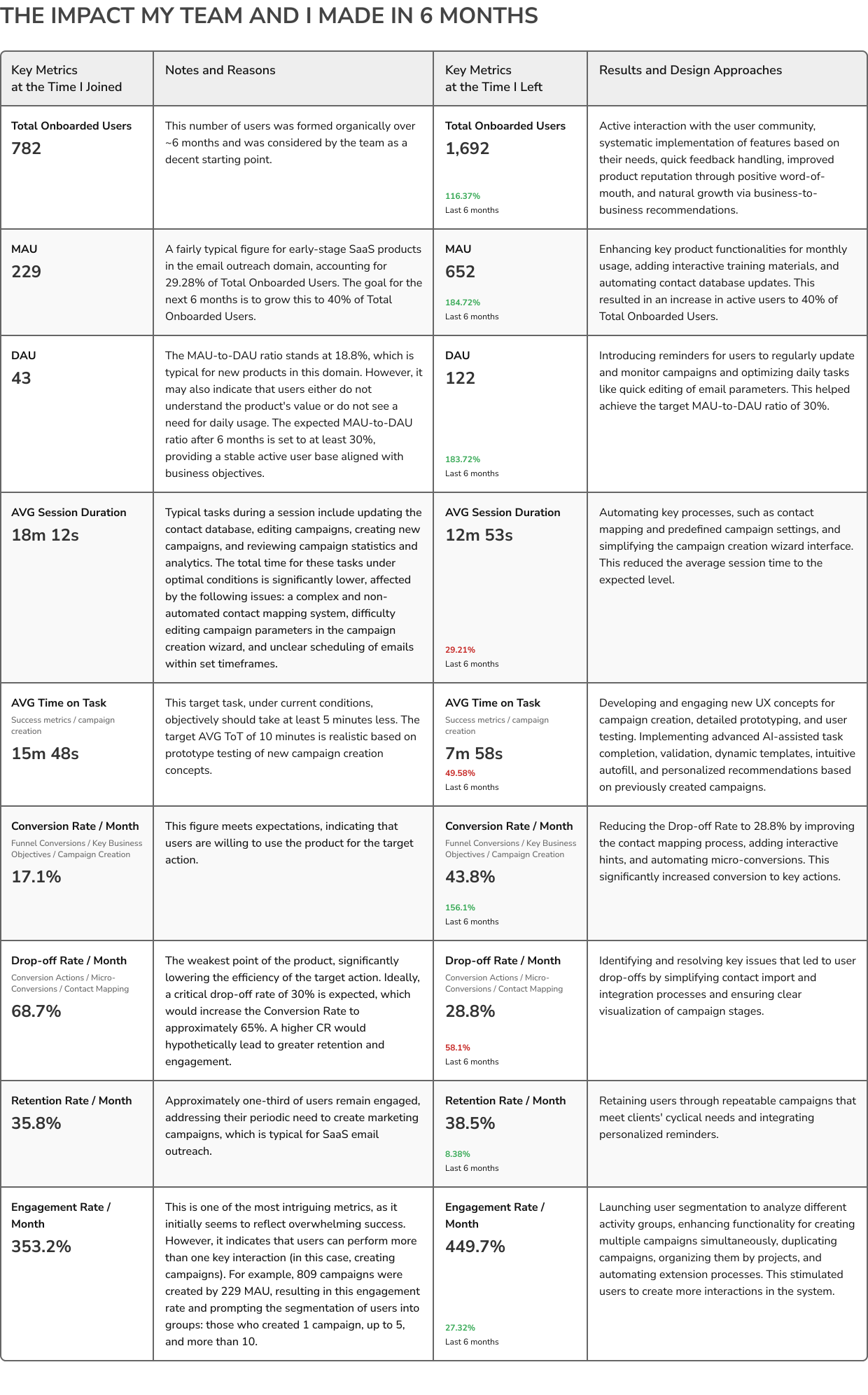
When I joined COT team, the product had established a decent starting point with a growing user base and moderate engagement. However, there were clear opportunities for improvement in user retention, task efficiency, and drop-off rates. Over six months, by implementing targeted changes based on user feedback, refining the UX/UI, and automating key workflows, we were able to significantly boost core metrics across the board.
II. My Challenges on Start
UX Problem Statements
-
The time on task is more than expected in industry and competitors have.
-
The drop-offs level on the contacts mapping is extremely high.
-
Minor interface changes (Eg.: Adding a dropdown), can trigger a cascade of expensive changes like validation updates or new types of notifications for instance, which creates a highly coast snowball effect.
-
Lack of performance for rendering 3K rows tables in more than 10 columns.
-
The design system structure is not applicable for consistently growing product and its props.
-
The decision making chain wasn’t consistent in the product evolving priorities that effects the consistency of the development process.
Business Problem Statements
-
Lack of a monetization strategy – there was no clear understanding of which existing features in the current product version could generate revenue immediately. This led to the absence of partial self-sustainability for the product, ultimately shortening the runway for utilizing investment funds.
-
Insufficient marketing support – over nine months after the MVP launch, no budget was allocated for product marketing and promotion. This resulted in low user engagement and a critical lack of traction by the time investment funds were depleted.
-
Inefficient resource allocation – despite the significant financial potential of the market (with an opportunity to capture ~25% of a $11.18 billion in 2023 segment), the focus was placed on prolonged product refinement, other words – dogproofing. This led to inefficient budget allocation, diverting resources from critical growth areas. The product had not a strong unique selling proposition to attract users and carve out a niche.
III. Research, Requests, and Analysis
Market Research
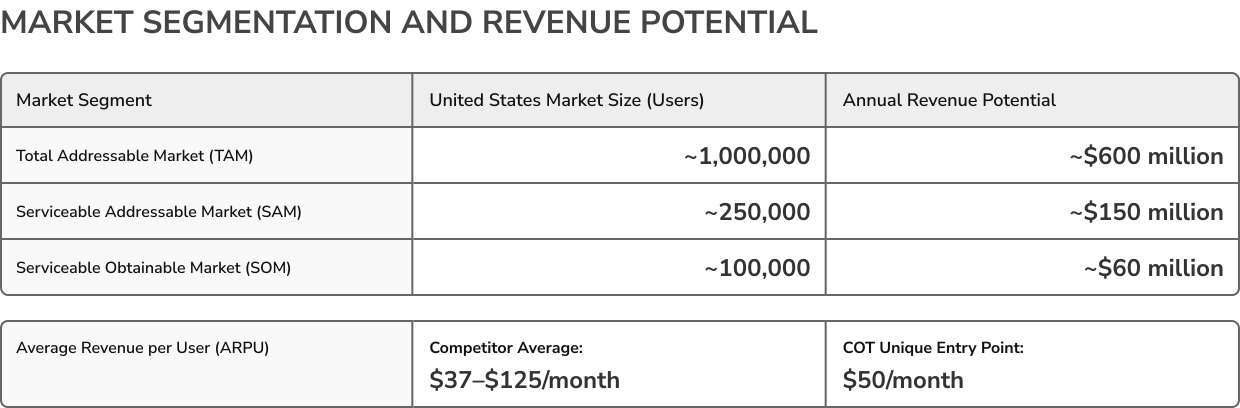
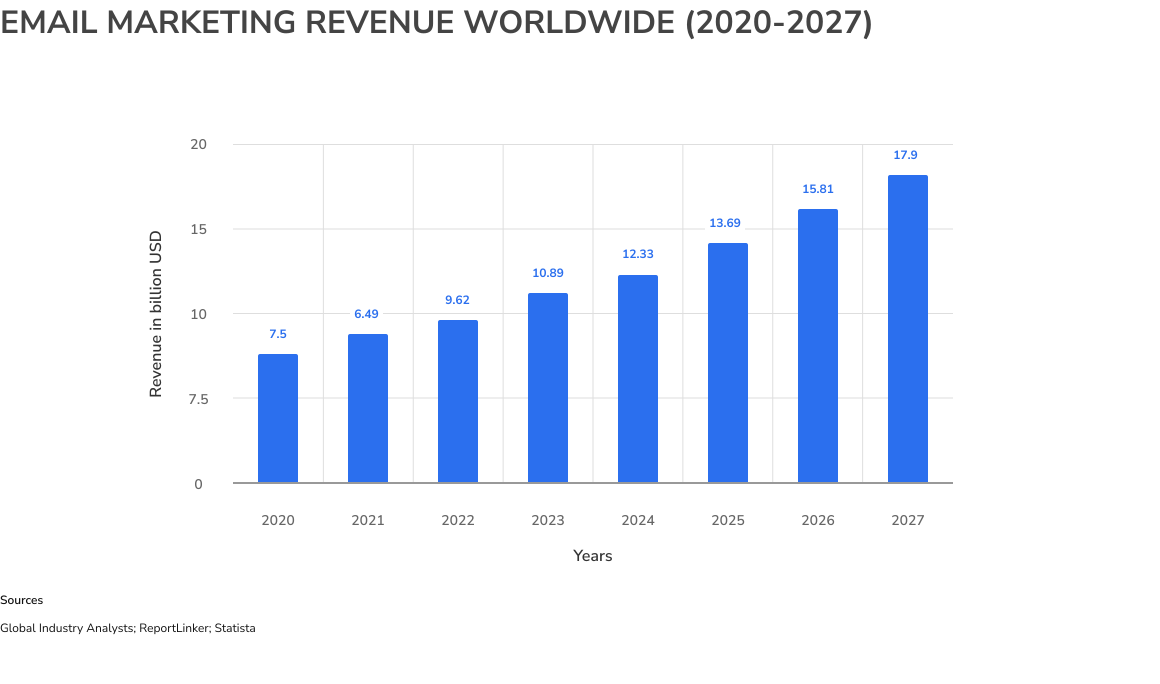
The email outreach market, valued at $11.18 billion in 2024, is vast yet highly competitive. Leading tools like Instantly, Woodpecker, Reply, Outreach, Lemlist, and Apollo dominate the space with feature-rich offerings, often at premium prices. In 2023, the email market had a total valuation of $10.89 billion, with 4.26 billion users globally. Outreach.io, for instance, holds a 2.63% market share, with 66,000 users based on the number of websites using the technology (source: Datanyze). The niche of cold outreach, email acquisition, sales automation, and sales engagement platforms accounts for a significant portion, with the English cold email market estimated at a minimum of $7.6 billion and at least 2.5 million users, of which approximately 45% are based in the US. The US market itself comprises a Total Addressable Market (TAM) of 1 million users, a Serviceable Addressable Market (SAM) of 250,500 users, and a Serviceable Obtainable Market (SOM) of 100,000 users.
COT’s freemium model became a differentiator, aiming to serve underserved segments like SMBs and startups. We underside well our strength and weaks, so tried to create onlife not only the user requests but also unique features that market didn’t have yet. May be this was a way to fail.
Competitors
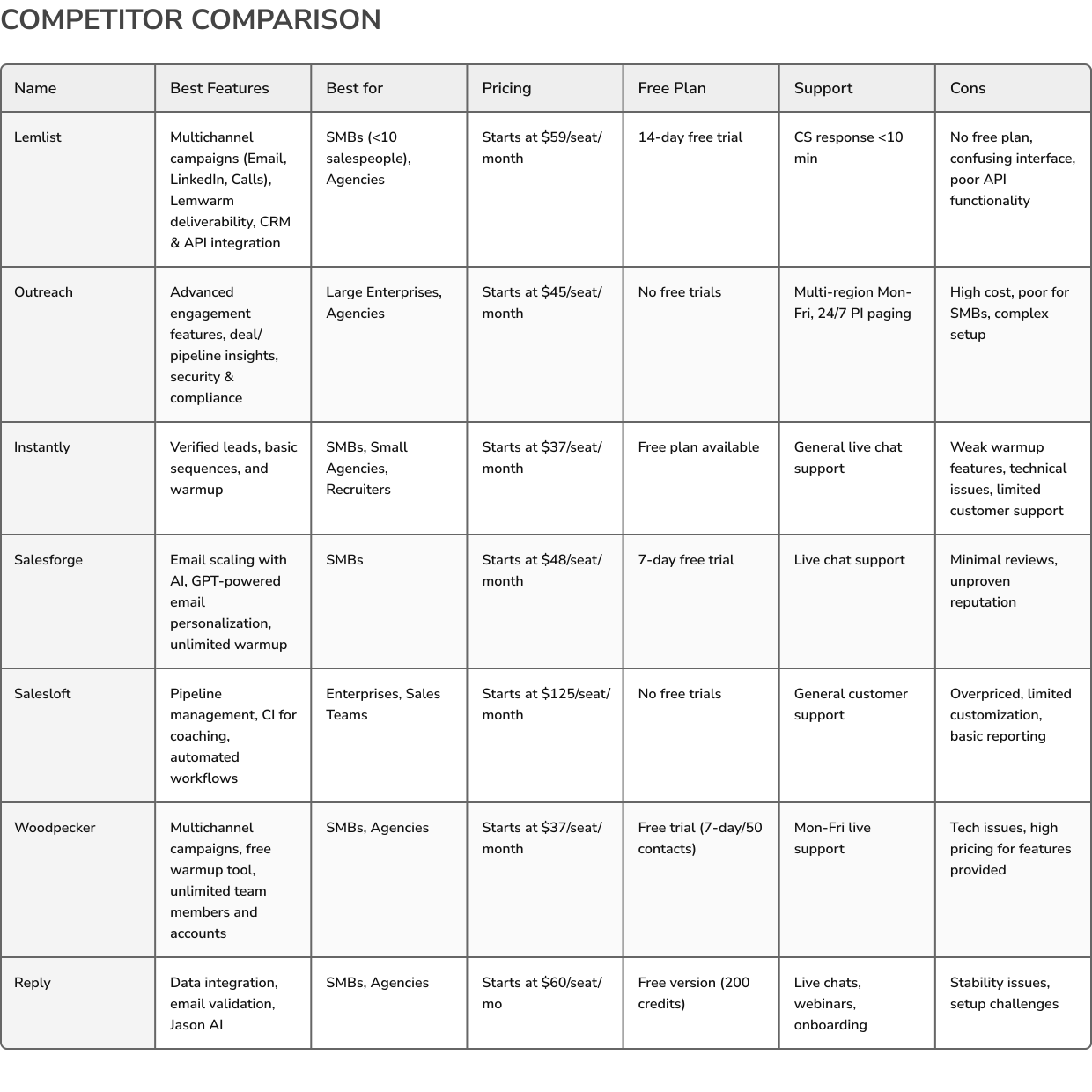
The email outreach market is highly competitive, with numerous tools offering diverse features tailored to specific user needs. This comparison examines leading solutions like Reply.io, Outreach.io, Instantly, Woodpecker, and others, highlighting their target audiences, pricing structures, and limitations. Through this analysis, I clarified COT’s market positioning, emphasizing its intuitive design, cost-effectiveness, and high performance.
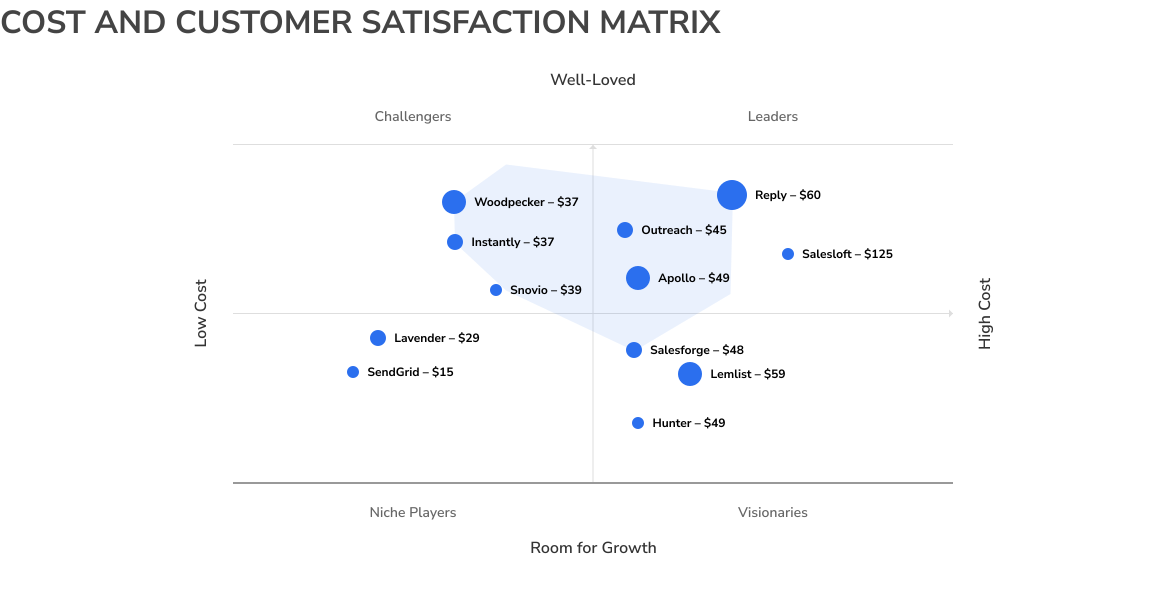
Cost-Efficiency and User Sentiment Analysis
My team and I decided to dive into the competitive landscape by comparing email outreach tools through this dynamic chart. We plotted each solution based on customer satisfaction (vertical axis) and pricing (horizontal axis), with the bubble size representing our interest in the product as a top competitor. It’s a powerful visual that highlights whether these tools are niche players, challengers, visionaries, or market leaders—and it gave us a clear sense of where we stand and where we can surpass the competition.
Functionality and Performance Evaluation
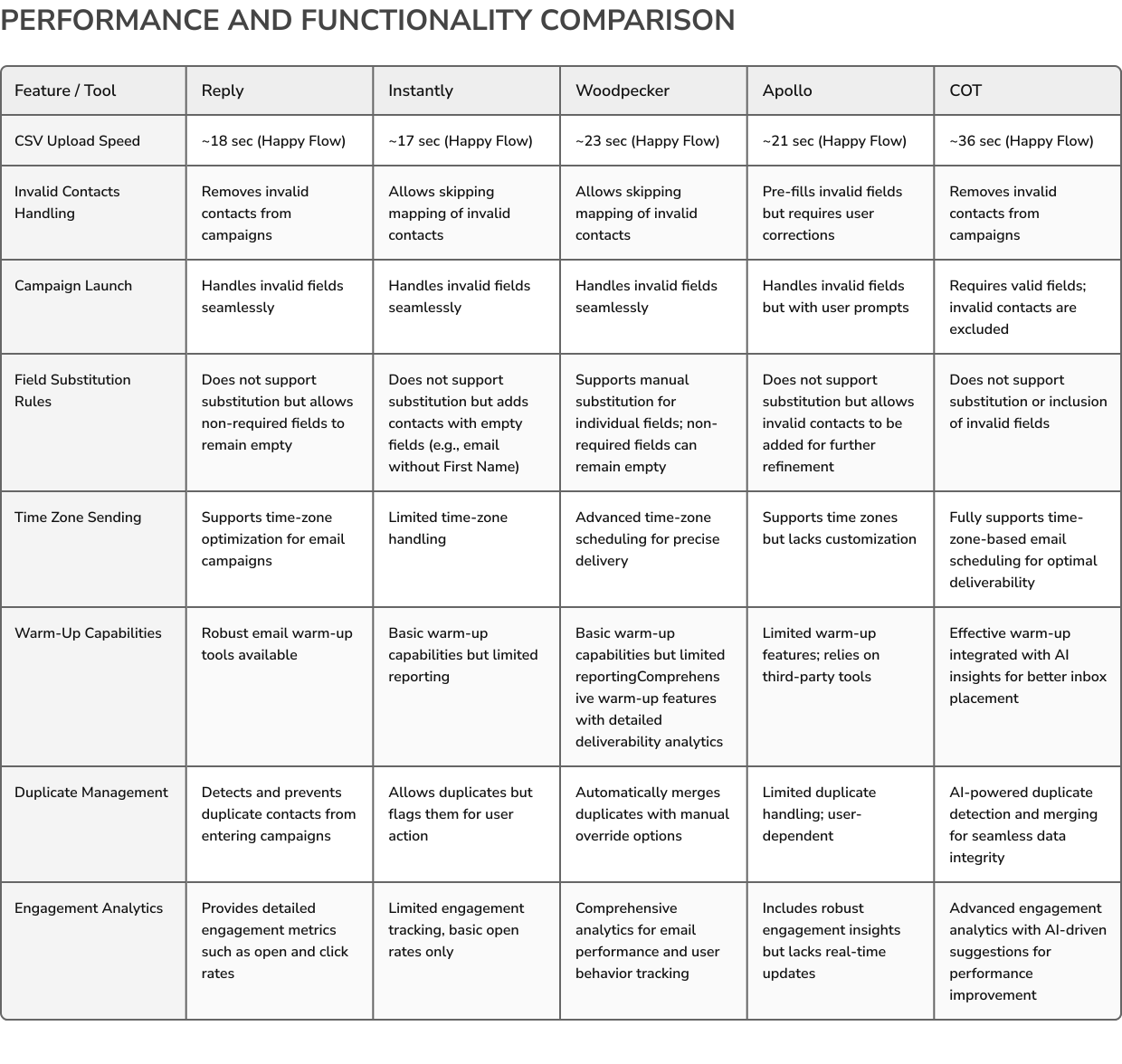
Our next step was to conduct a thorough performance analysis of multiple email outreach tools, including COT, to evaluate key functionalities like invalid contact handling, campaign launches, and field substitution rules. We dove deep into the details, benchmarking against competitors like Reply, Instantly, Woodpecker, and Apollo. This comparison not only showcased where COT excels but also uncovered areas for improvement, providing a clear roadmap to stay ahead of the competition.
User Research
User Overview
When we began exploring the ideal user base for COT, our research painted a vivid picture of diverse, yet interconnected needs. COT caters primarily to small and medium-sized businesses, early-stage startups, and even large enterprises with small, agile outreach teams. These users often lack deep technical expertise and require intuitive, cost-effective tools to manage their outreach campaigns effectively.
We identified patterns through user interviews and market analysis that highlighted shared challenges, such as improving response rates, overcoming deliverability issues, and streamlining manual processes. Additionally, the demand for AI-driven personalization and insights became a recurring theme. This research guided our design choices, ensuring that COT met the practical needs of these users while aligning with their long-term growth objectives.
Ideal Customer Profile
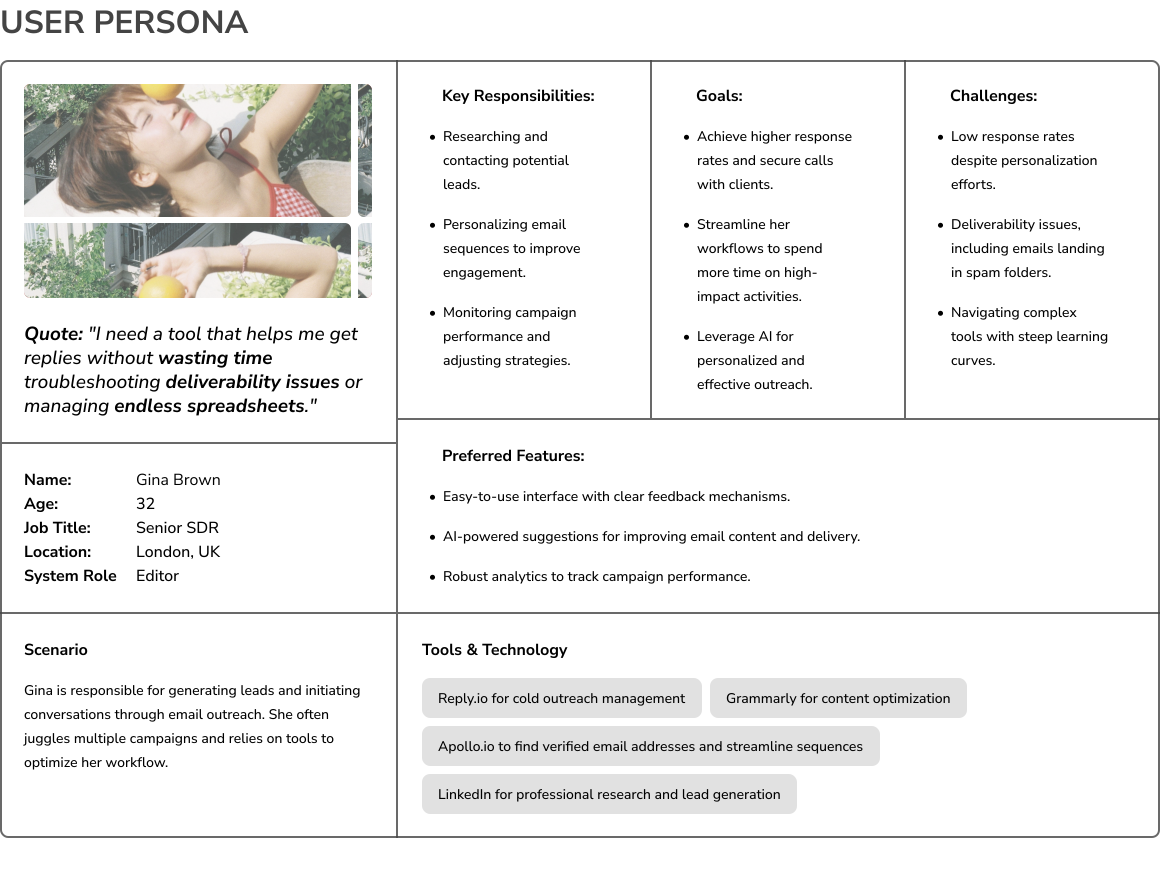
To design COT with precision, we developed detailed user personas based on aggregated data and feedback. These personas represent the core audience COT serves: startup founders, sales development representatives (SDRs), business development representatives (BDRs), and small marketing teams. Each persona reflects unique needs, challenges, and goals but shares a common demand for ease of use, stability, and cost-efficiency in their outreach tools. Here’s an example of an end user with the system role of Editor.
Crafting the Sustainable User Journey
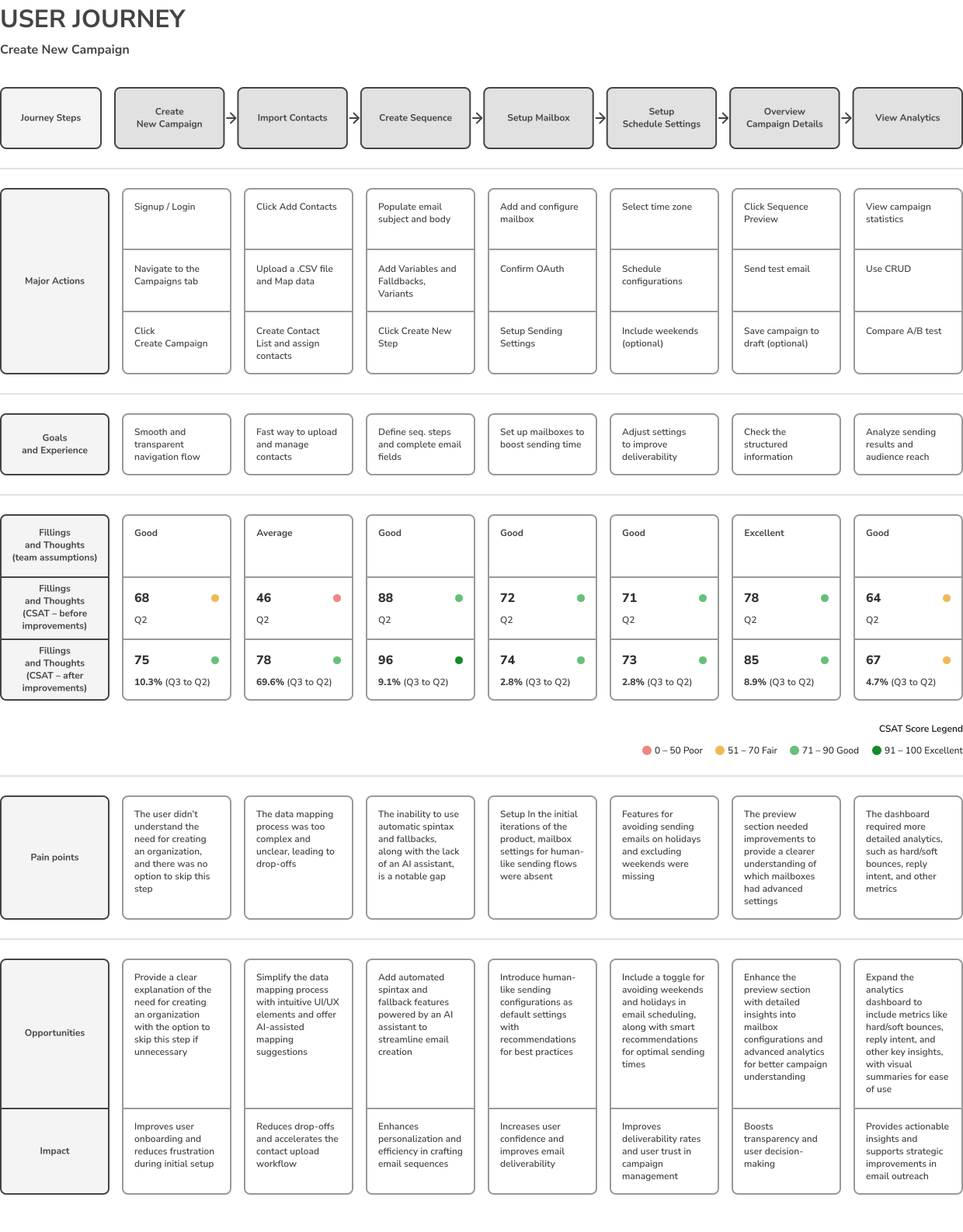
The user journeys for COT are designed to simplify complex workflows, empowering users at every step. This example illustrates the process of creating a new campaign, covering each critical action from logging in to analyzing performance. Key steps include importing contacts, setting up mailboxes, and scheduling emails, all while addressing pain points and uncovering opportunities for improvement.
Through this flow, we aimed to create an intuitive experience that enhances clarity, streamlines tasks, and helps users achieve their goals efficiently. With smooth navigation, actionable insights, and user-focused enhancements, this journey showcases how COT makes email outreach effortless and impactful.
Listening to Our Users
As part of COT’s product development, user interviews played a crucial role in understanding end-user challenges, needs, and expectations. The participants included SDRs, BDRs, and department heads, providing diverse perspectives. These insights helped shape COT’s functionality and usability, ensuring it addressed real-world scenarios. Below is a structured summary of the interview findings, categorized by question groups and corresponding insights.
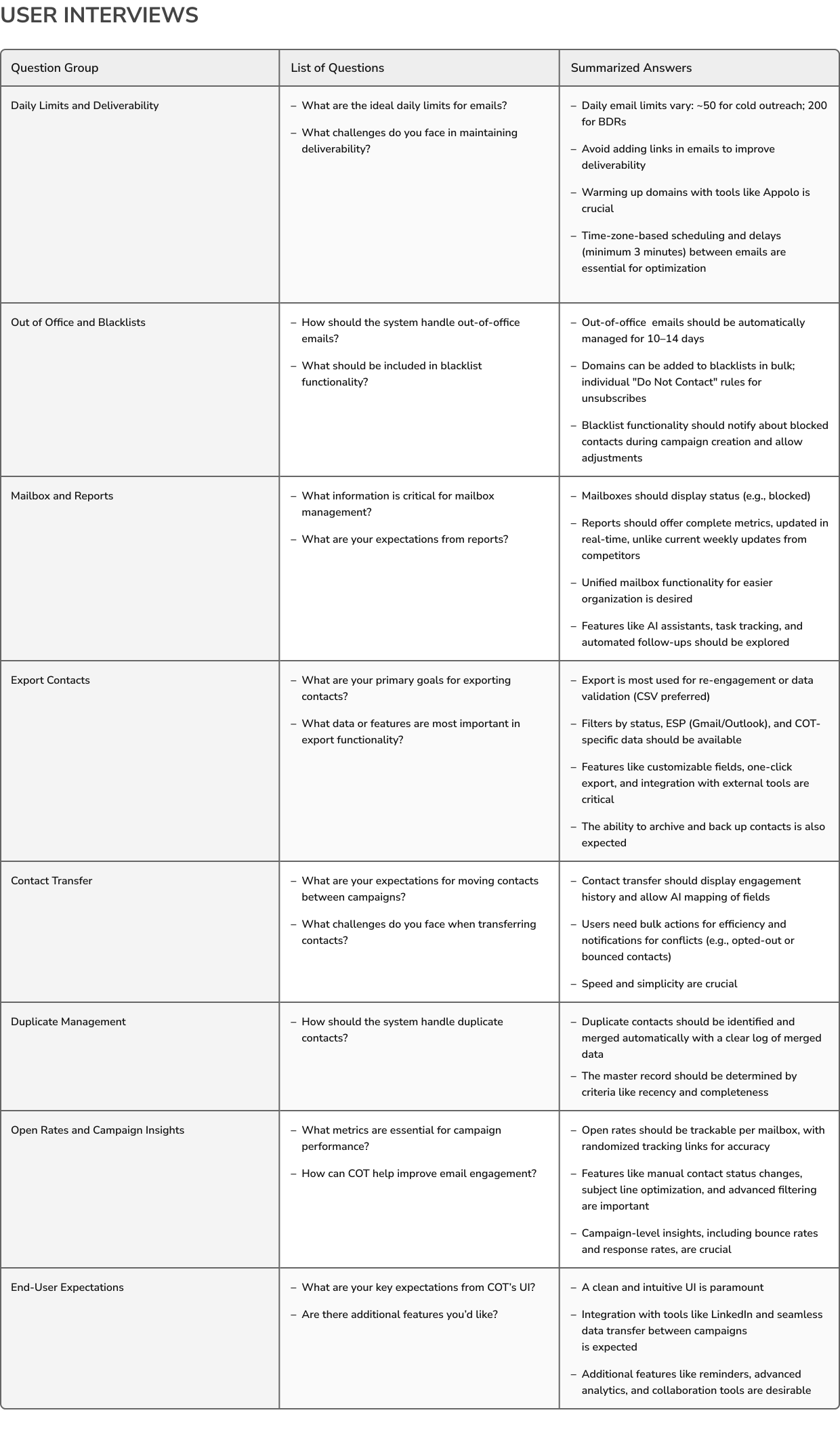
After speaking with SDRs, BDRs, and department heads, we gained valuable insights into their challenges and expectations. These conversations clarified where our product could truly make a difference and what features would provide the most value. It’s a great reminder that listening to users is key to building a product that genuinely fits their needs and workflows.
User Needs Prioritization
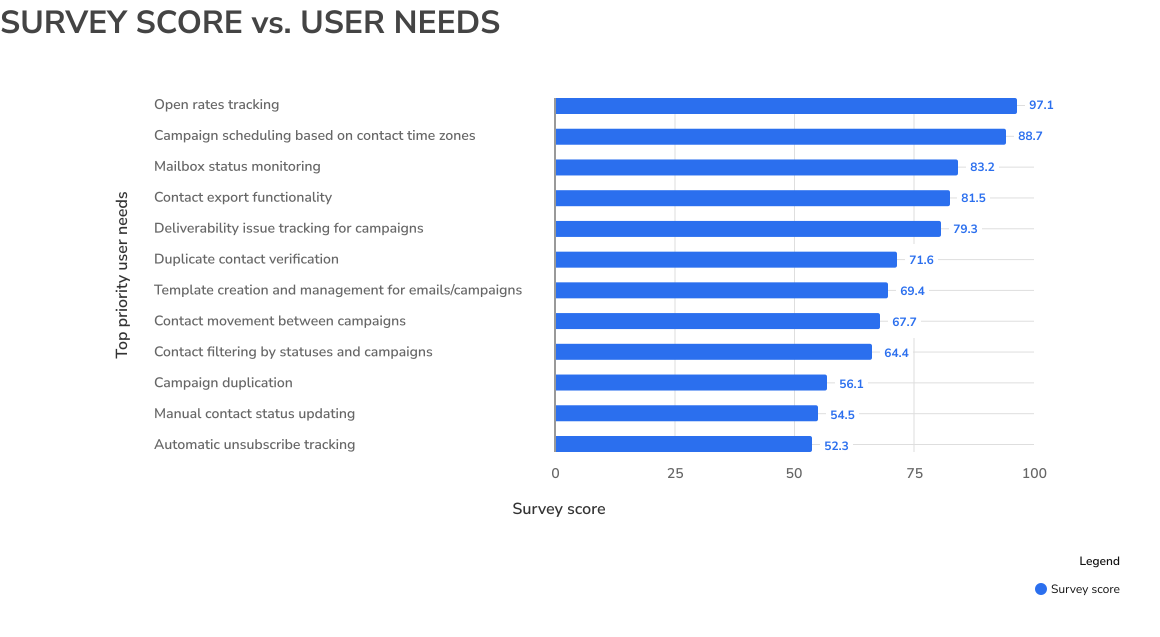
Feature Focus and Strategy
Understanding what users truly need is the heart of creating a product that delivers real value. My team and I dove deep into conversations with COT’s users, listening to their challenges, pain points, and goals. These interviews weren’t just about gathering feedback—they became the foundation for prioritizing features that solve immediate problems while setting the stage for long-term success. By focusing on these insights, we’ve ensured that COT stays intuitive, impactful, and aligned with what matters most to our users.
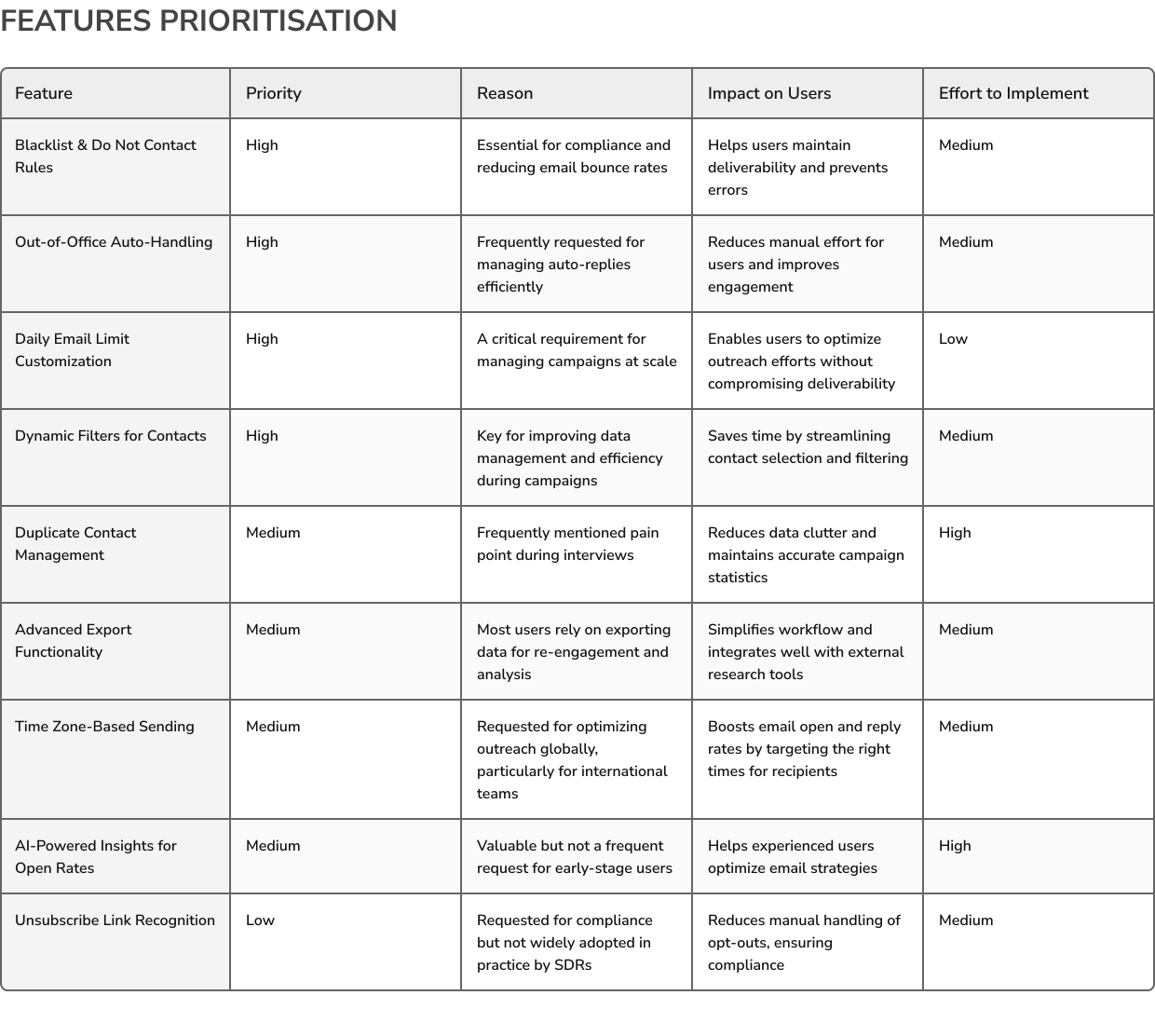
Maximizing Impact with Balanced Effort
We identified high-priority, high-impact features – such as Duplicate Contact Management and Out-of-Office Auto-Handling – as core opportunities to significantly enhance the user experience, even though they demand considerable development resources. In contrast, lower-priority, low-effort features, like Link Avoidance Suggestions, can be tackled later as incremental enhancements.
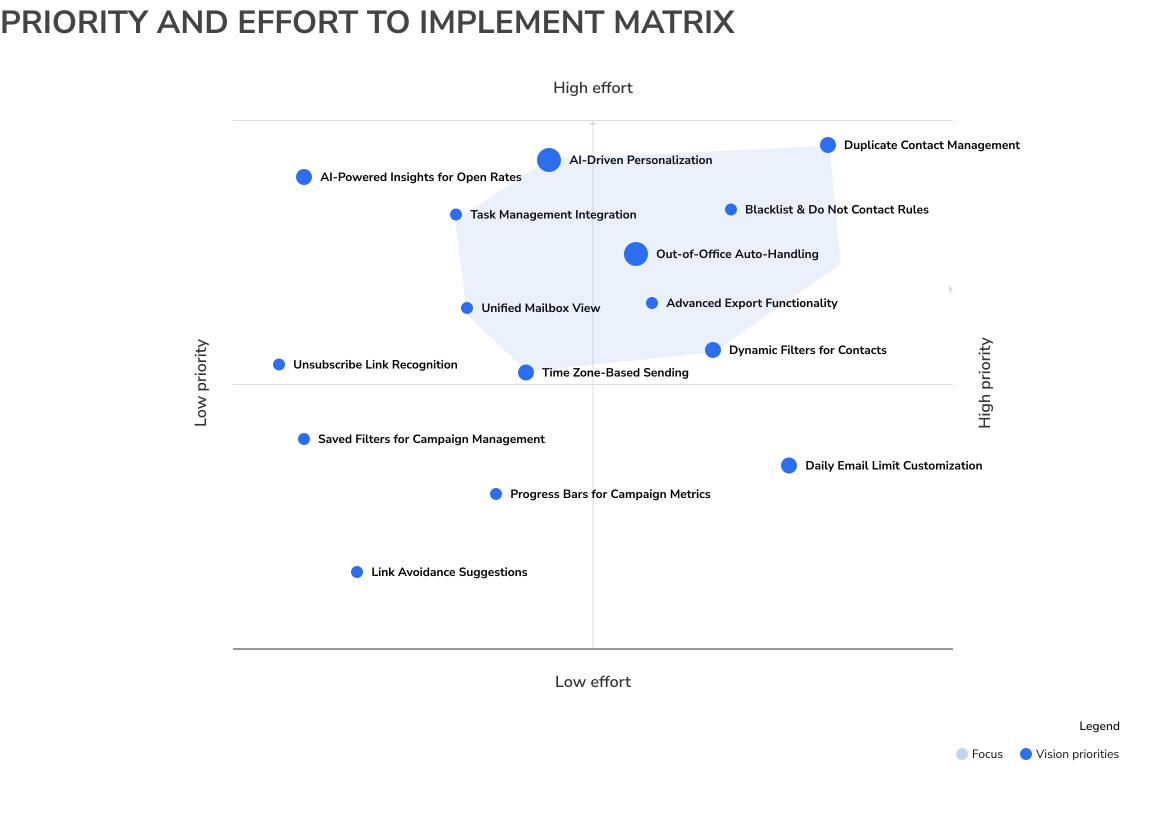
By using this approach, we ensure that resources are allocated efficiently to deliver the greatest value to users while maintaining a clear focus on long-term product goals.
User Data Insights
Our approach to understanding user behavior was comprehensive, leveraging a diverse range of data sources. From detailed metrics and flow funnels in Amplitude, to session recordings and click analysis in LogRocket, and robust data aggregation and forecasting via MongoDB, we captured every critical touchpoint. This was complemented by qualitative insights gained through community-driven interviews, user feedback from our support center (Intercom), and cohort analysis.
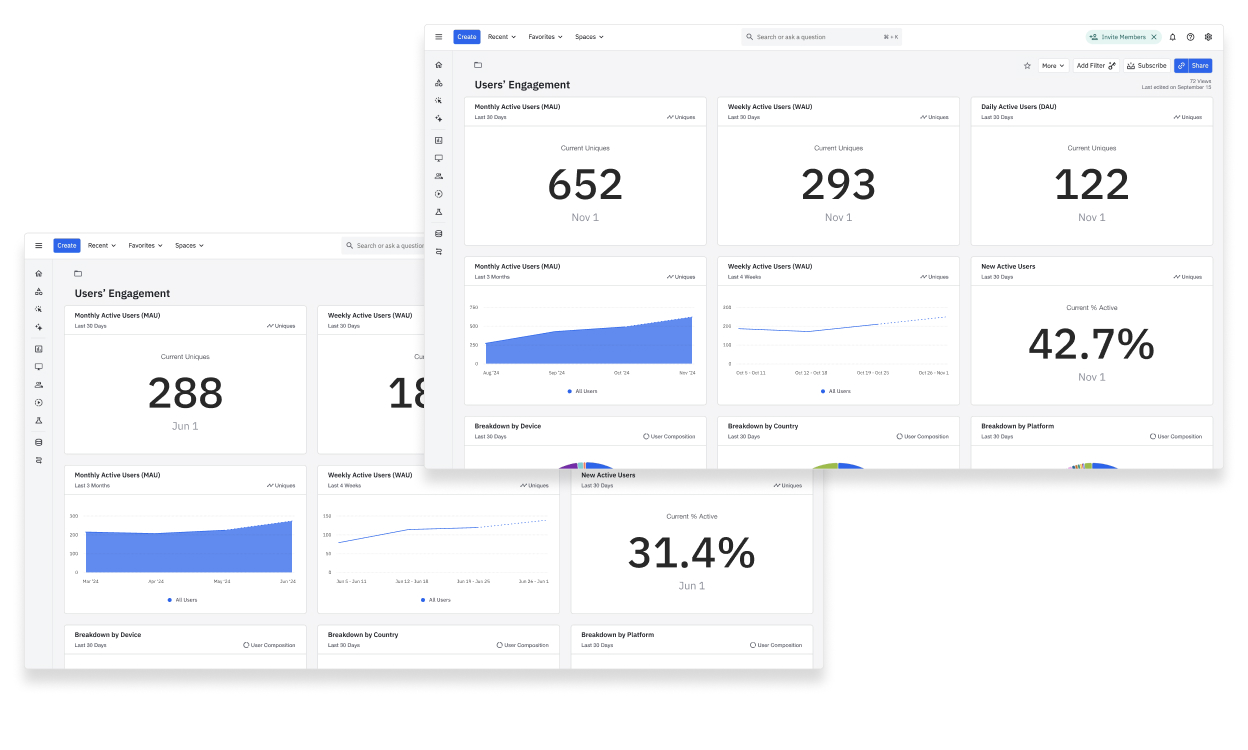
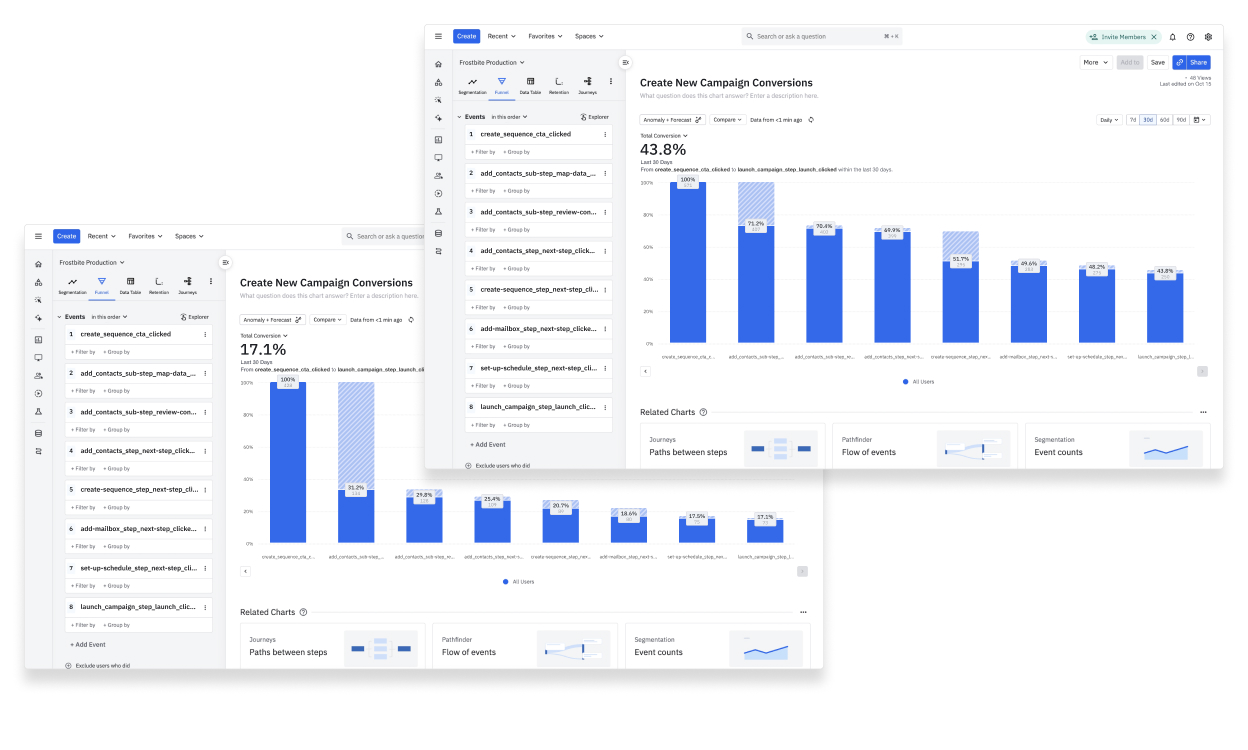
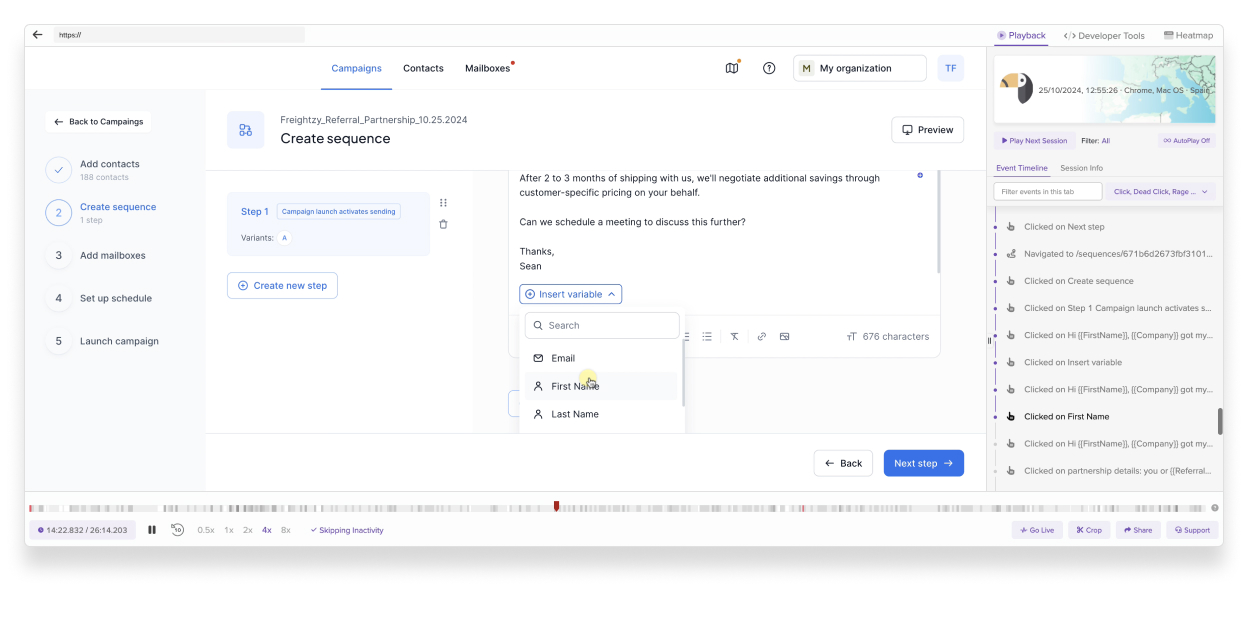
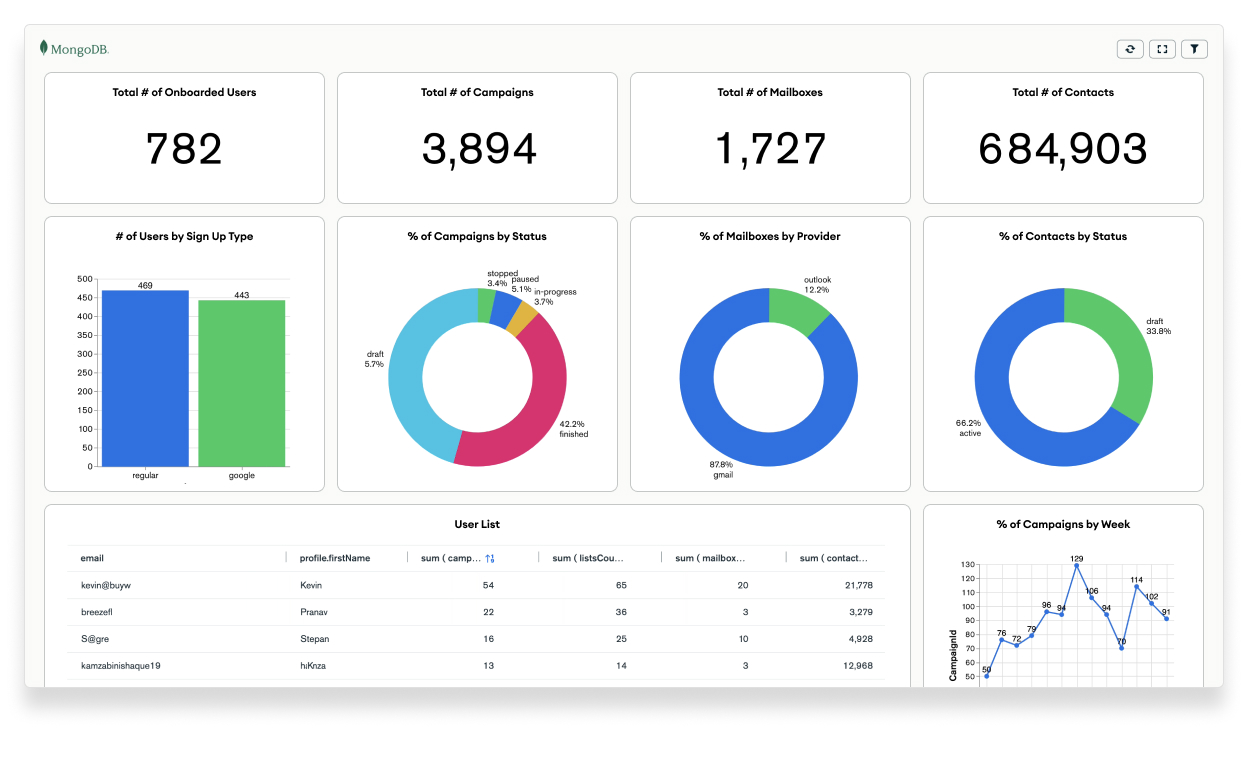
This holistic strategy provided us with a clear and transparent understanding of the user journey, their needs, behavior patterns, usability challenges, and areas for improvement. Armed with these insights, we were able to align our product development efforts with real-world user expectations, ensuring the delivery of a product that truly meets their needs.
Turning Insights into Action
Research was at the core of shaping COT into a tool that delivers value. We dug deep into user behaviors, market trends, and competitor gaps to uncover exactly what our users needed.
Through detailed market analysis, we pinpointed where other tools were falling short and used those insights to design smarter solutions. Conversations with SDRs, BDRs, and team leads gave us a firsthand understanding of the challenges users face—whether it was improving email deliverability or automating tedious processes. Surveys and feedback helped us prioritize the features that matter most and turn user preferences into practical, actionable ideas.
It wasn’t just about information; it was about transformation. It gave us the clarity to create a platform that simplifies workflows, solves real problems, and exceeds user expectations. Every insight we gathered fueled the evolution of COT, making it a tool that users can rely on to succeed.
IV. Practical Processes for Better Design
For me, this is probably one of the most important sections of this case study. As a team design lead, I often hear candidates say things like, “Oh, I left because of poor processes at the company.” I always ask, “Which processes exactly? What specifically didn’t work for you? What would you want to change, fix, or improve?”
More often than not, candidates themselves don’t fully understand what they mean by “processes,” instead resorting to vague statements about typical design thinking or double diamond frameworks. But when it comes to practical application—how to implement or integrate these methodologies into the current processes of a company, a team, or with those you collaborate with to build a product—unfortunately, the understanding just isn’t there.
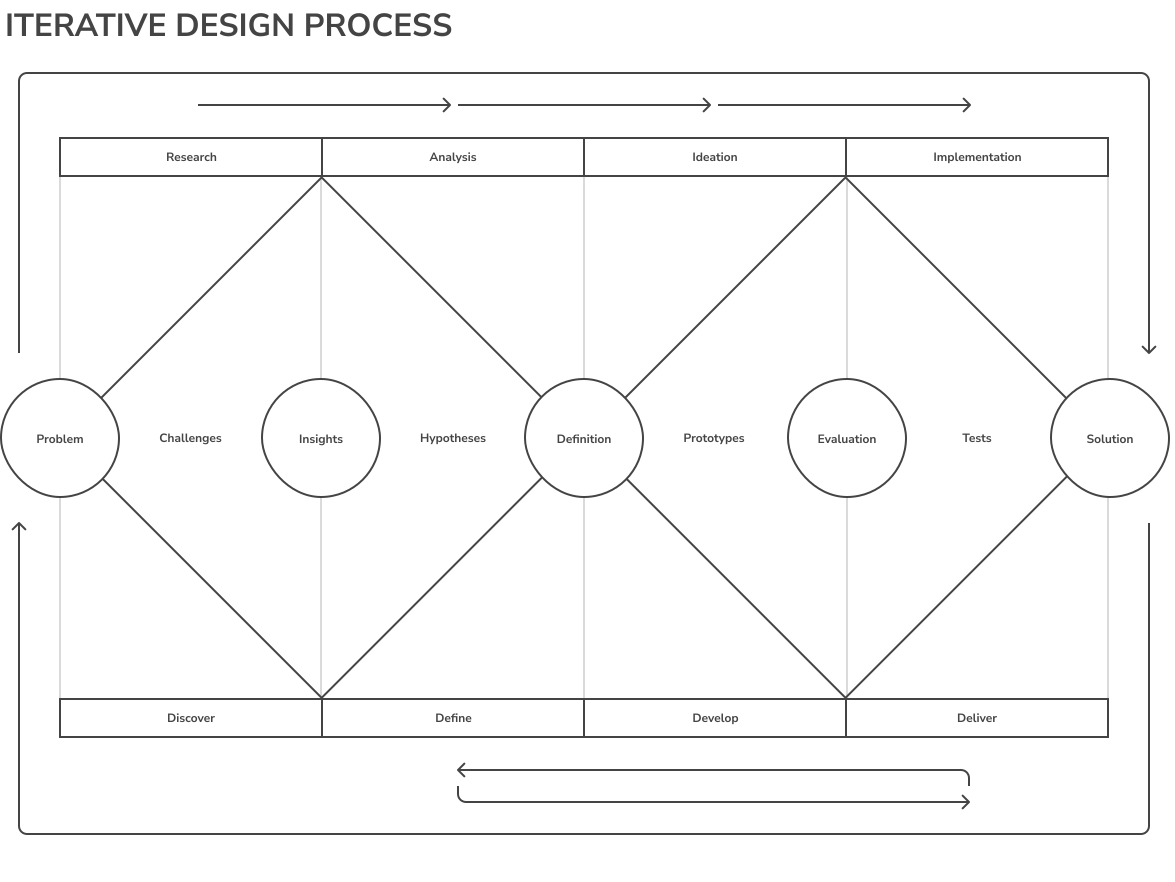
That’s why, first and foremost, I find it crucial to share how thoroughly I approach the segmentation of the design process, my understanding of the nuances of product creation, and the iterative loops involved.
But let’s back to the case – at the heart of COT’s development was a robust and dynamic design process, blending methodologies like Design Thinking, Agile, and Lean UX to address challenges efficiently and deliver exceptional outcomes. Each process was tailored to tackle specific needs, whether it was designing new features, refining existing ones, addressing user requests, or auditing the system for usability. These workflows ensured a user-focused, iterative approach that kept the product adaptable and impactful. Below, you’ll find an overview of each process and how it contributed to building a better COT experience.
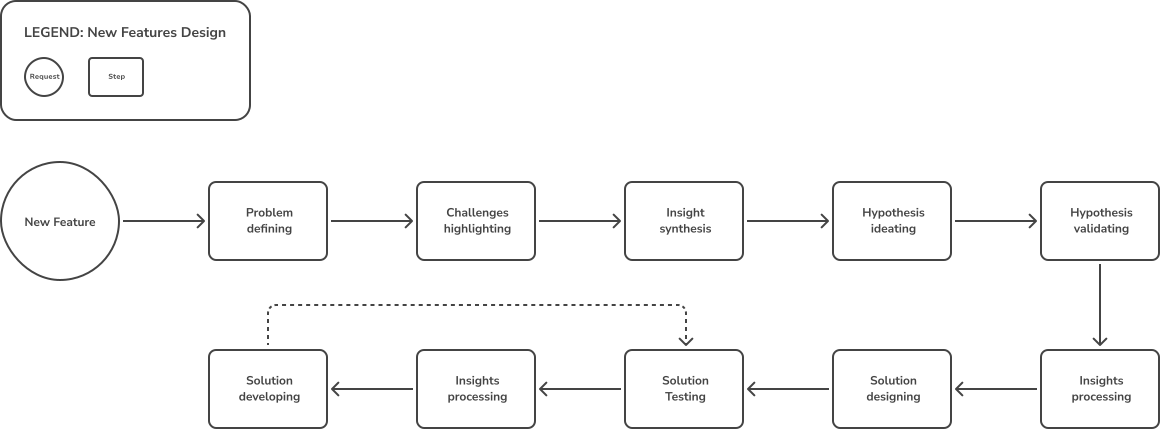
New Feature Design
Creating new features involved a collaborative and research-driven approach. It started with understanding user needs, brainstorming innovative solutions, and validating ideas through prototypes and user testing. The goal was to deliver features that aligned with user expectations while enhancing overall functionality.
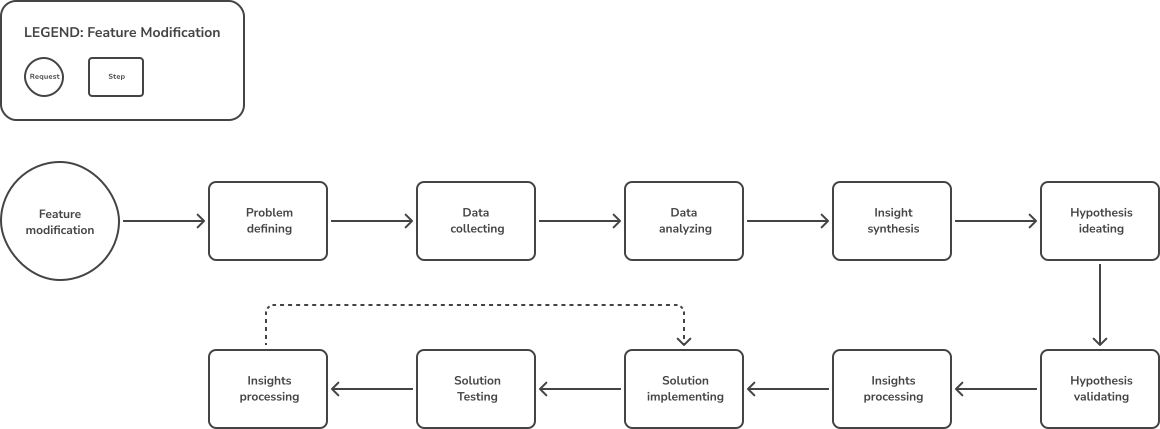
Feature Modification
Improving existing features required close analysis of user feedback and performance metrics. This process focused on iterative updates, ensuring that modifications added real value without disrupting the user’s workflow.
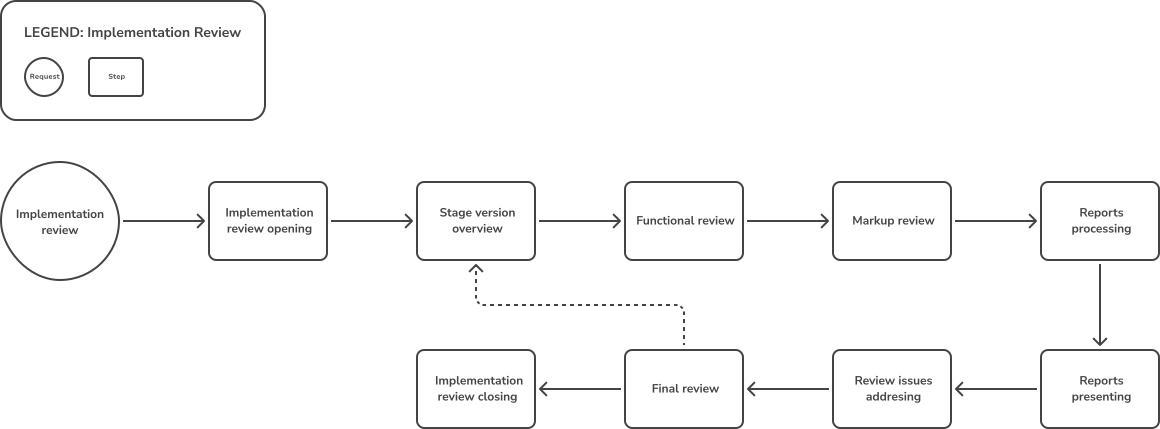
Implementation Review
Post-launch reviews ensured that implemented features met quality standards and performed as expected. This process combined user feedback and internal testing to refine functionalities and address any overlooked issues.
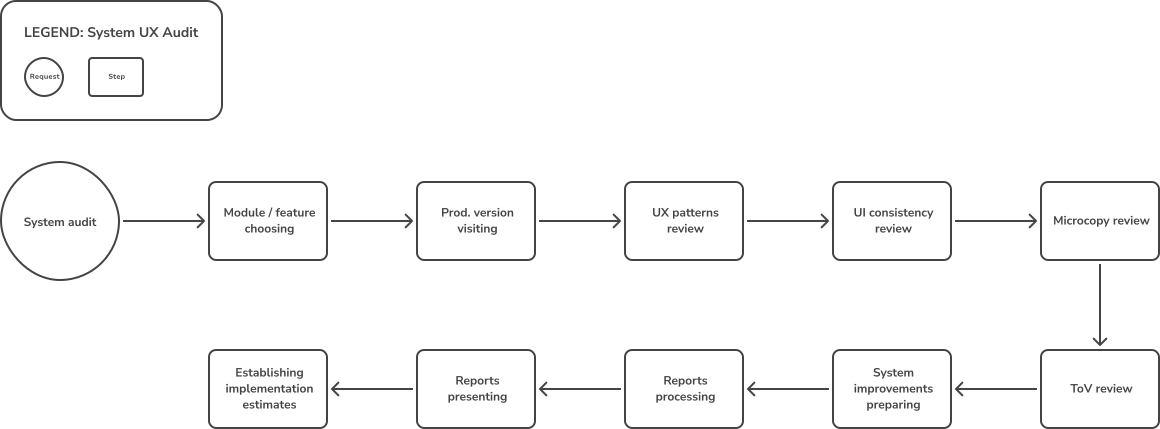
System UX Audit
Regular UX audits were key to identifying usability gaps. This process leveraged analytics, user interviews, and expert evaluations to propose actionable improvements, ensuring a seamless user experience.
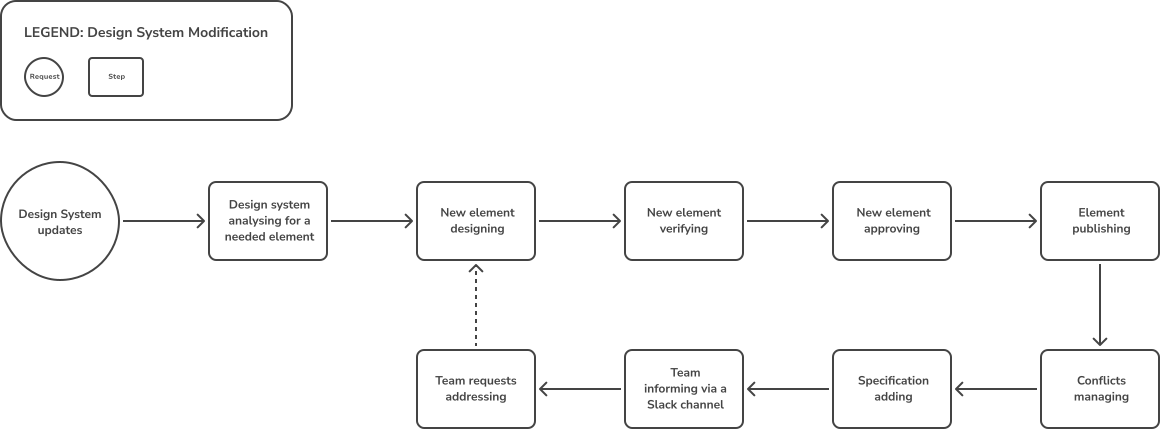
Design System Modification
Updating the design system maintained consistency and adaptability across the platform. This process focused on expanding components, refining styles, and ensuring alignment with evolving product goals.
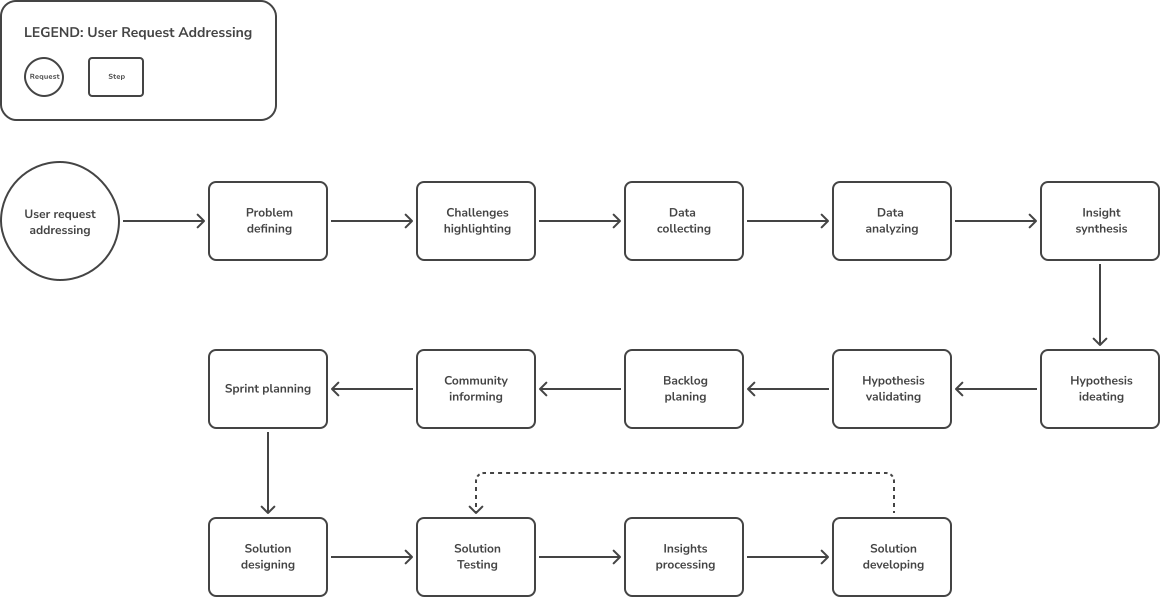
User Request Addressing
User requests provided direct insights into priorities. This process streamlined the evaluation and implementation of user-driven changes, balancing feasibility with the potential impact on satisfaction and retention.
V. Crafting the Experience
Information Architecture
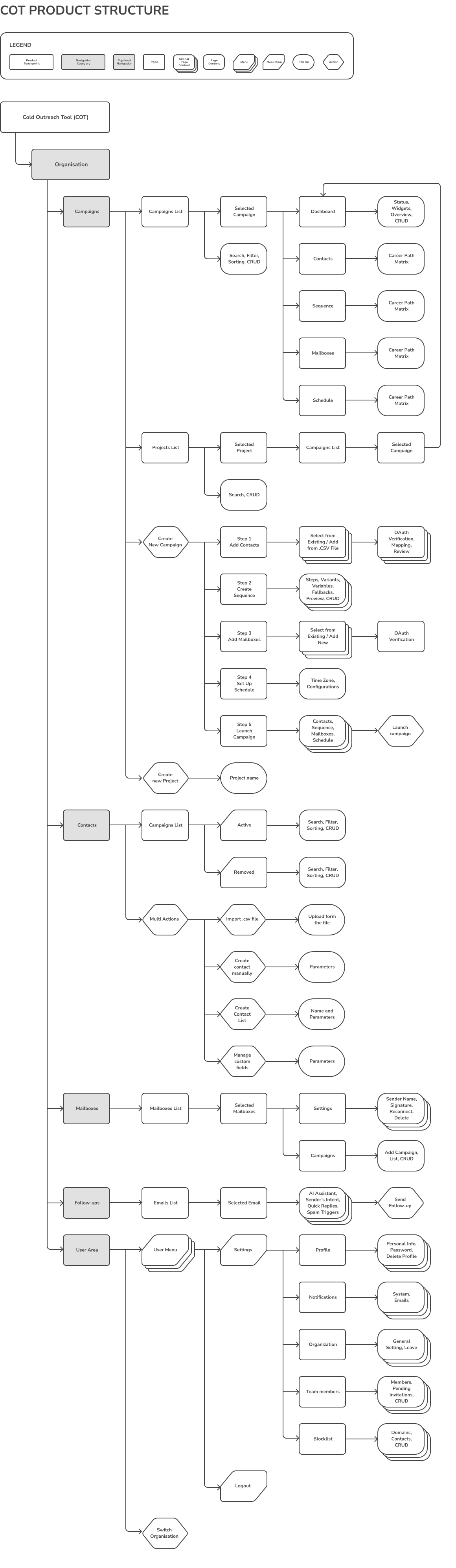
User research revealed that, on average, our typical SDR creates up to seven ad campaigns per day. Over the course of a month, the number of created items exceeds the level that allows for comfortable navigation within the product. This triggered the idea of introducing organizations as a top-level entity, as some SDRs work with multiple companies. Consequently, we proposed the decomposition of campaigns within each organization by projects to improve the organization and management of campaigns.
As a product designer, I faced an interesting question: why don’t users leverage the search functionality to access specific campaigns? After reviewing dozens of user sessions, I concluded that the search feature lacks the flexibility needed to display relevant data effectively. This issue was brought up during a product planning session. Considering the time and human resources required to modify the search module (more than 240 man-hours), it was decided to prioritize adding CRUD functionality for managing campaigns by projects. This decision also aligned with requests from our users and community.
The addition of organizations as a separate top-level entity, along with projects, led to changes in the product’s information architecture, which received positive feedback from our users. Here is an example of the final Information Architecture outcome.
Product Ecosystem
The ecosystem of this product could easily be the subject of a separate case study. However, here I will focus on the key points that were most interesting and challenging for me.
- Design System for Two Different Products – the main obstacle to effectively using the design system was that it was created as a single system for two entirely different products: the one I was working on and another, which I will no longer mention in this case. This resulted in a large number of irrelevant components, icons, and specifications that had no connection to my product. The first rule of any design system is to keep only relevant and up-to-date information.
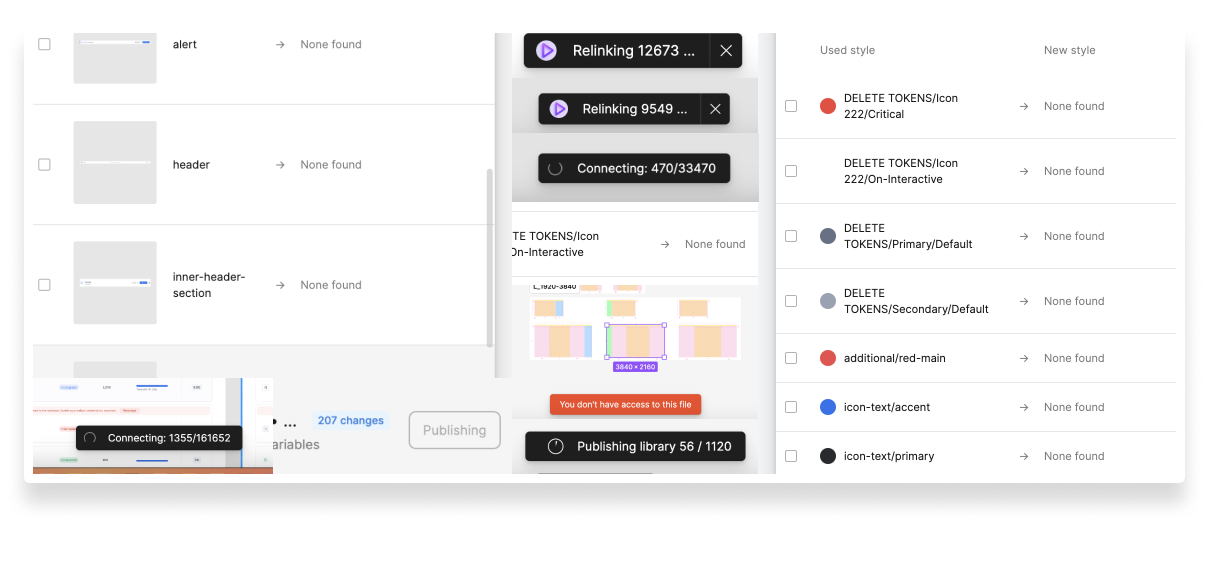
- Use of Third-Party Libraries – the design system for my product was built using third-party libraries, also known as “design kits.” This significantly complicated the process of updating and maintaining components. In some cases, recursive updates occurred between component libraries: one library referenced another, which in turn referenced the first. These situations led to hours of work fixing recursion issues and disrupted the stability of the system.
- Attempt to Separate the Component Library – an attempt was made to separate the component library and make it independent, specifically tailored for my product. However, testing this process revealed that relinking alone would take approximately 72 hours, assuming no bugs occurred. Furthermore, it did not guarantee complete success: updated components might not correctly sync with all working screens and files. Additionally, fact-checking these changes required extra time and resources. We used both the native update functions in Figma and the Design System Organizer plugin (DSO Plugin).
Scaling Peaks to Design System Stability
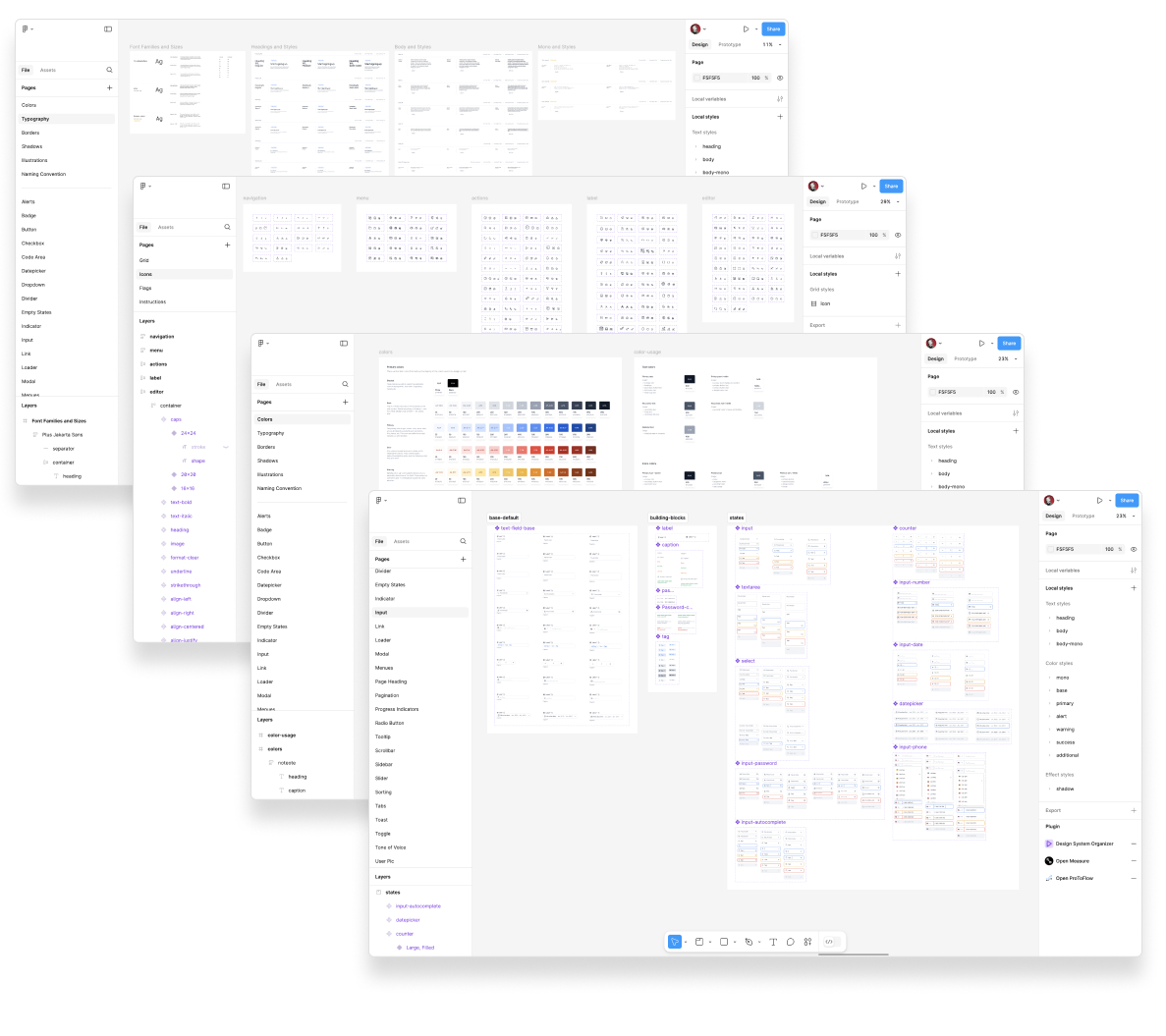
After overcoming numerous challenges, I successfully resolved all existing issues in the design system and built a stable, solid version tailored exclusively for this product. This refined system now contains only relevant, up-to-date components and is free of recursive dependencies, ensuring seamless functionality and easy maintenance. The iterative process of testing, updating, and fact-checking has resulted in a robust design foundation that supports the product’s growth while maintaining efficiency and reliability. Here are the final screens showcasing the cohesive and fully functional design system.
Product Overview
It is crucial to highlight that in a product already in production, the percentage of entirely new design solutions is usually quite small. In my case, approximately 60% of the time was dedicated to thoroughly understanding the task: identifying which aspects of the system might need changes or additions, analyzing their impact on the system and its users, and, most importantly, questioning whether those changes were truly necessary. We repeatedly revisited this question: is it needed, and why? This recursive process of questions and answers led my team and me to formulate hypotheses, which we then tested in practice.
Ultimately, by leveraging the patterns of the current system and adhering to the established norms and scaling rules of the product – many of which I contributed to – I developed functionality that aligned with human-centered design principles and business requirements. These solutions were crafted to meet both the tactical and strategic established product goals.
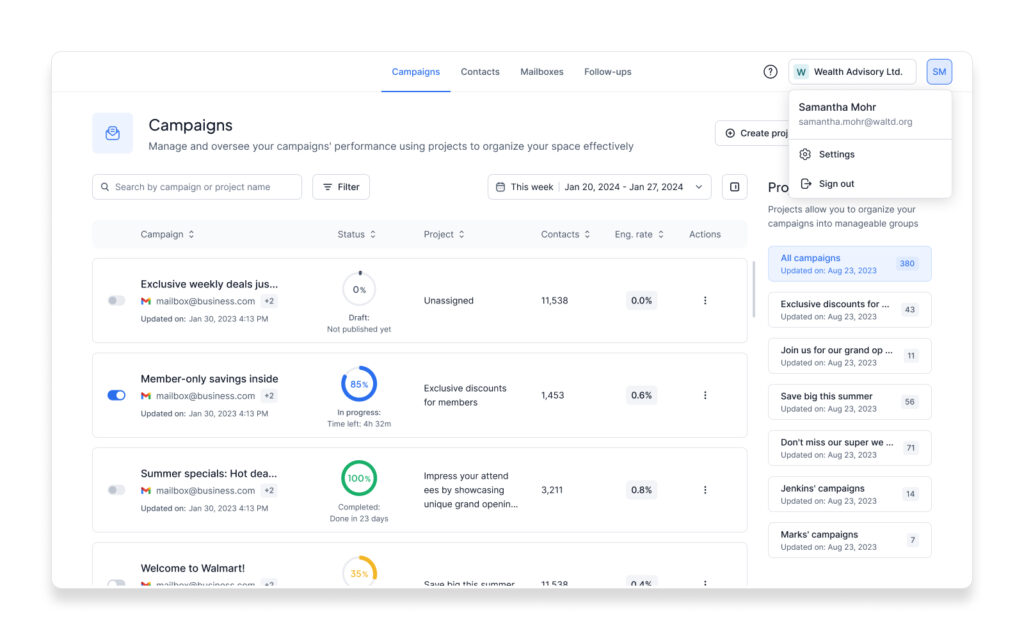
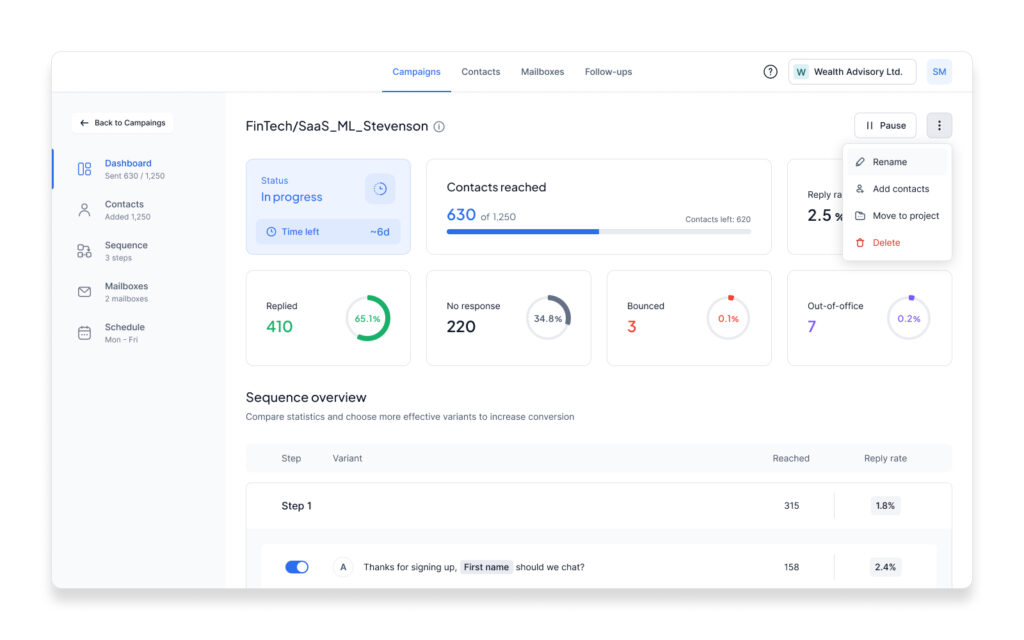
Campaigns Management Suite
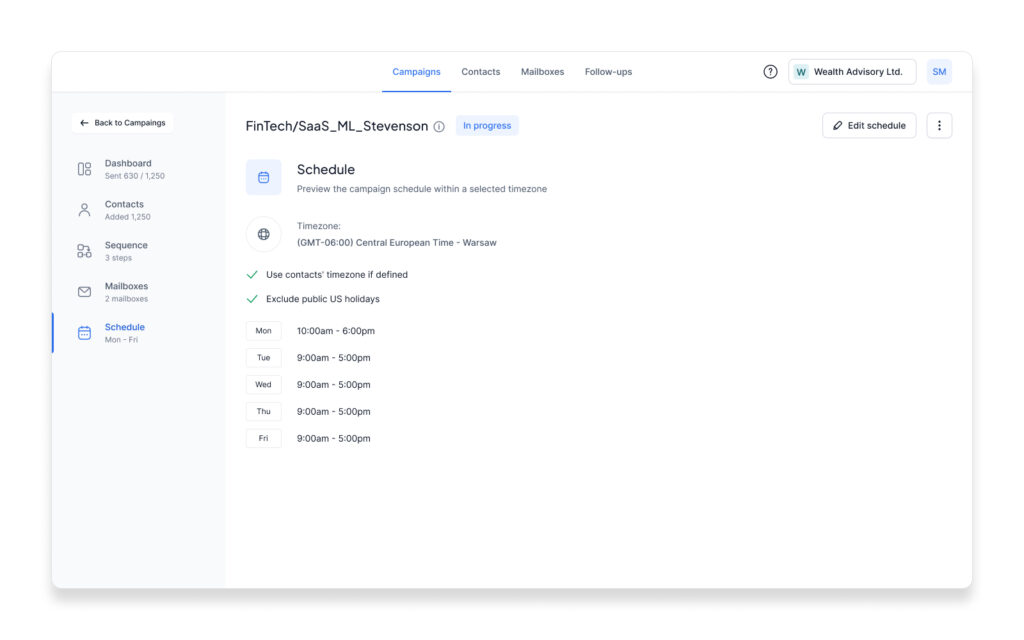
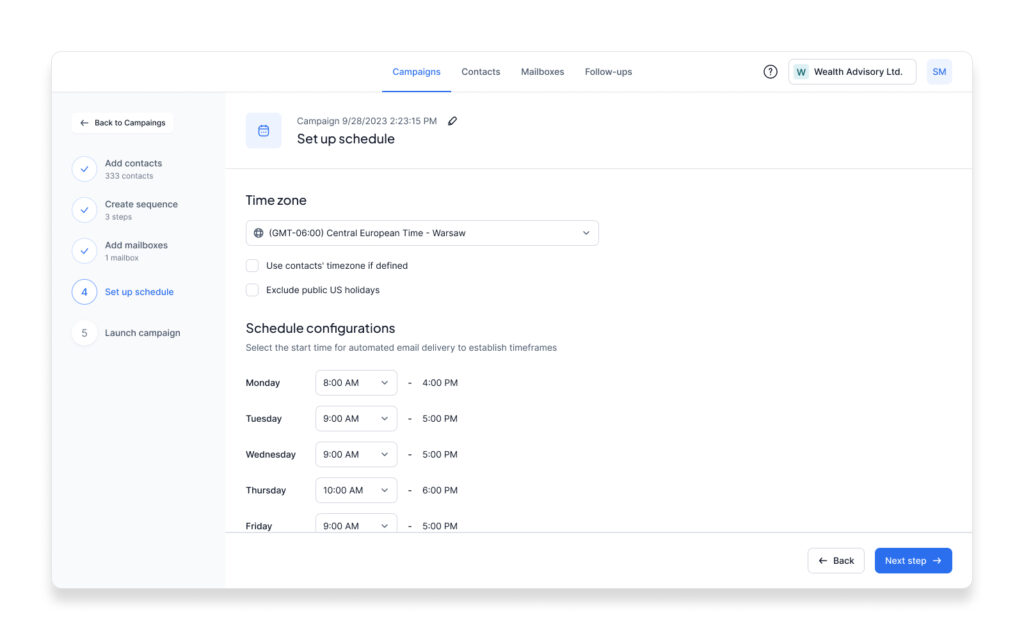
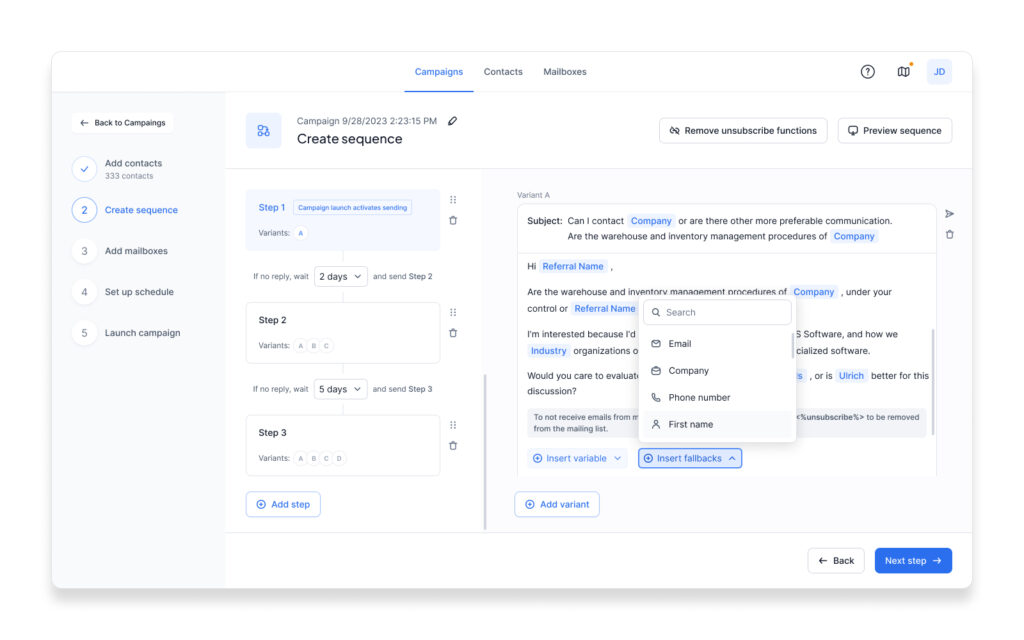
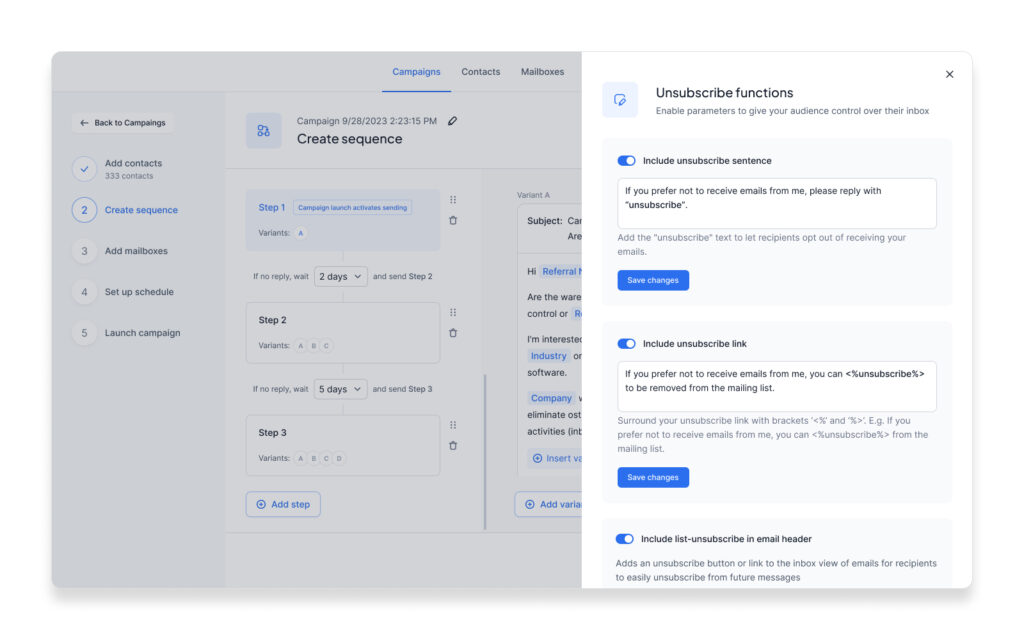
Creating a New Campaign
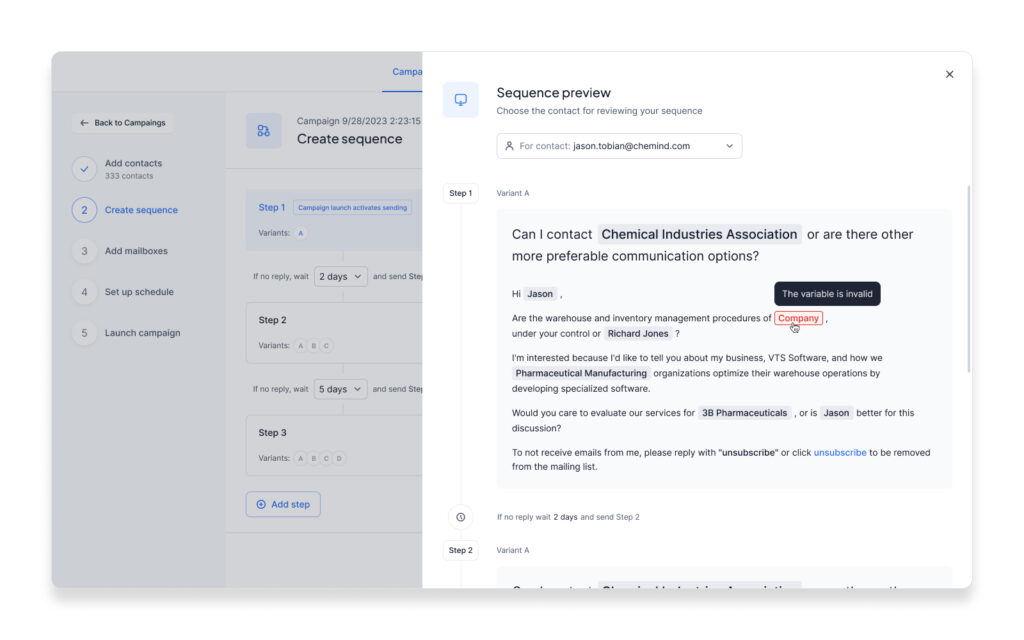
The campaign creation flow simplifies the process of reaching your audience effectively. From setting up schedules tailored to time zones and holidays to designing email sequences with personalized variables, this feature ensures maximum engagement. Users can preview their sequences, enable unsubscribe options, and validate inputs for a flawless campaign launch. Whether you’re planning a single email or a multi-step campaign, this flow is designed for efficiency and accuracy, ensuring your outreach efforts are always impactful.
Flexible Sending and Organization Management
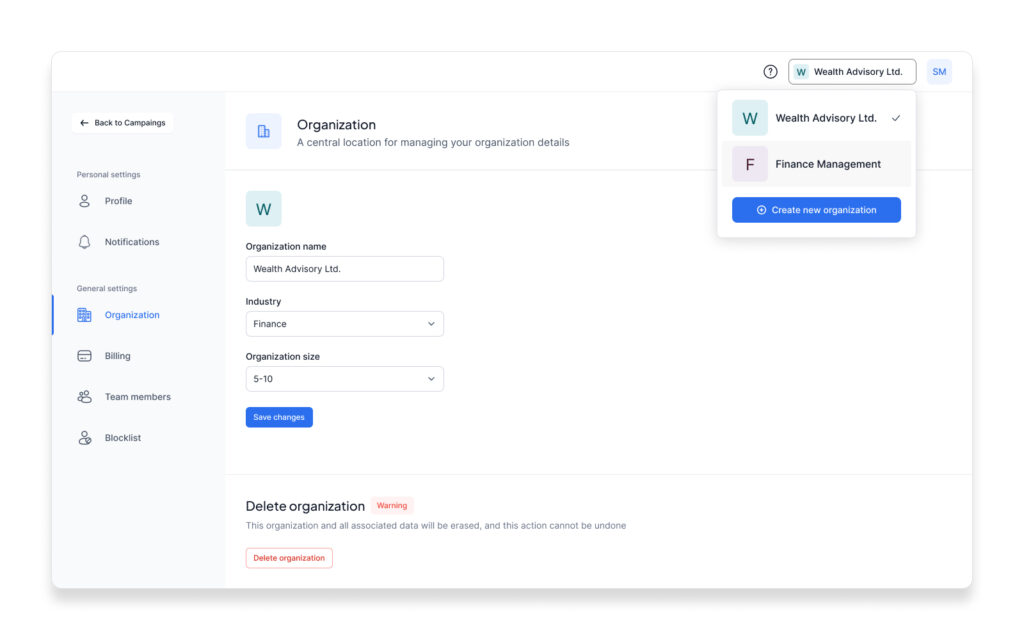
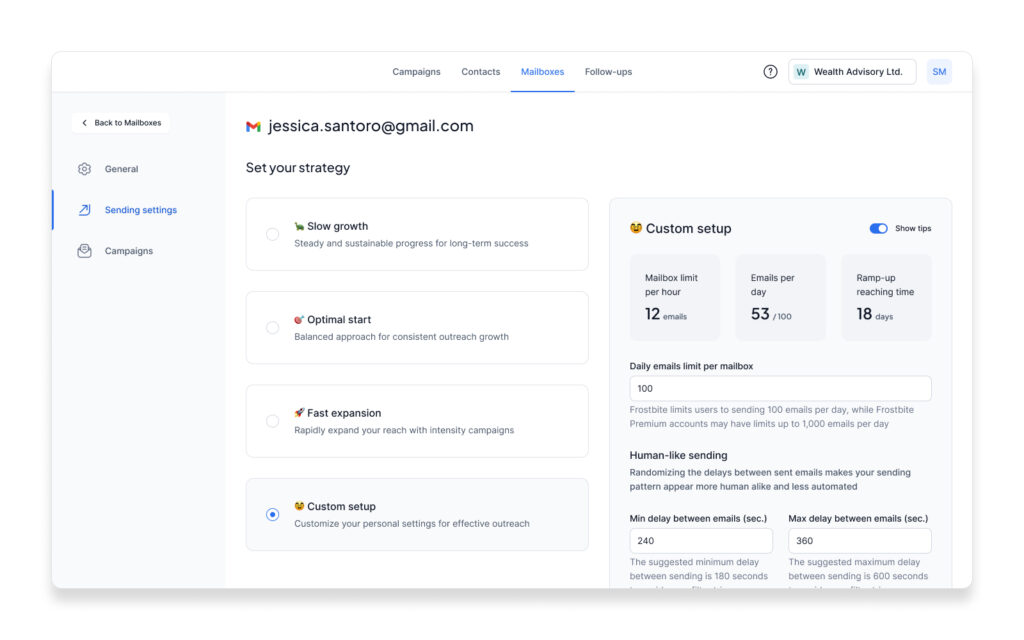
These screens empower users with precise control over their outreach strategy and organizational setup. From customizing mailbox sending limits and ramp-up strategies to aligning outreach with time-zone settings and human-like sending patterns, these tools offer tailored configurations for optimized email performance. Meanwhile, the organization management interface simplifies administrative tasks, allowing users to define organizational details, manage team members, and streamline settings. This combination ensures a seamless, user-centric approach to email campaigns and organizational oversight.
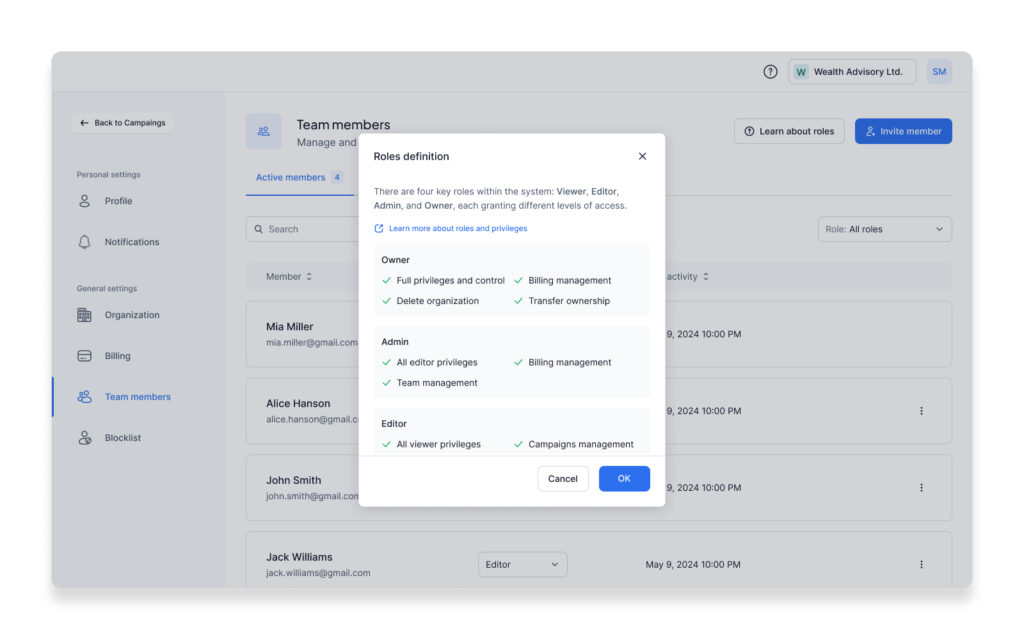
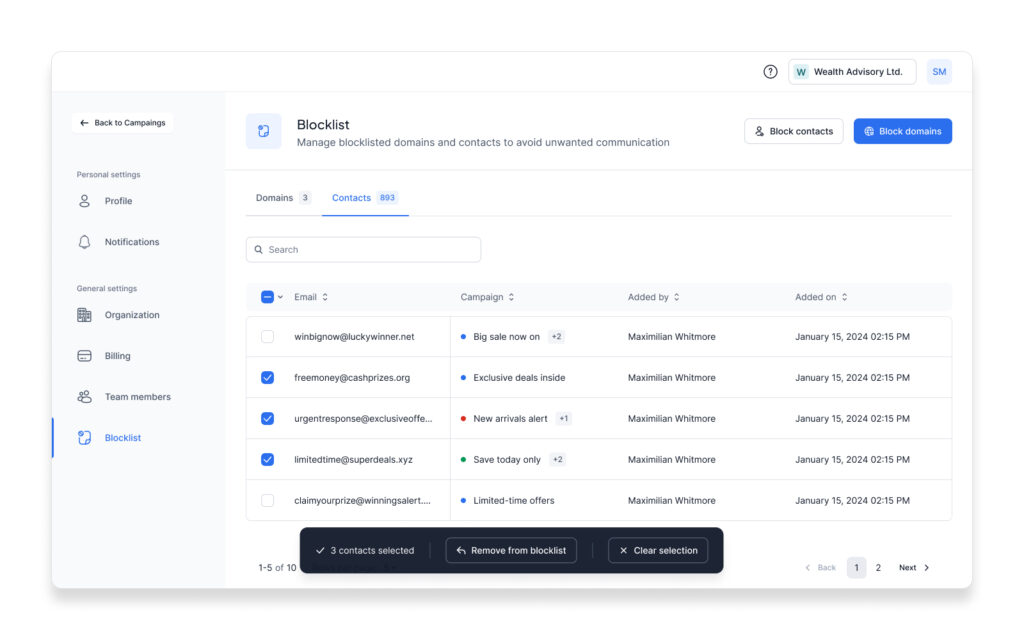
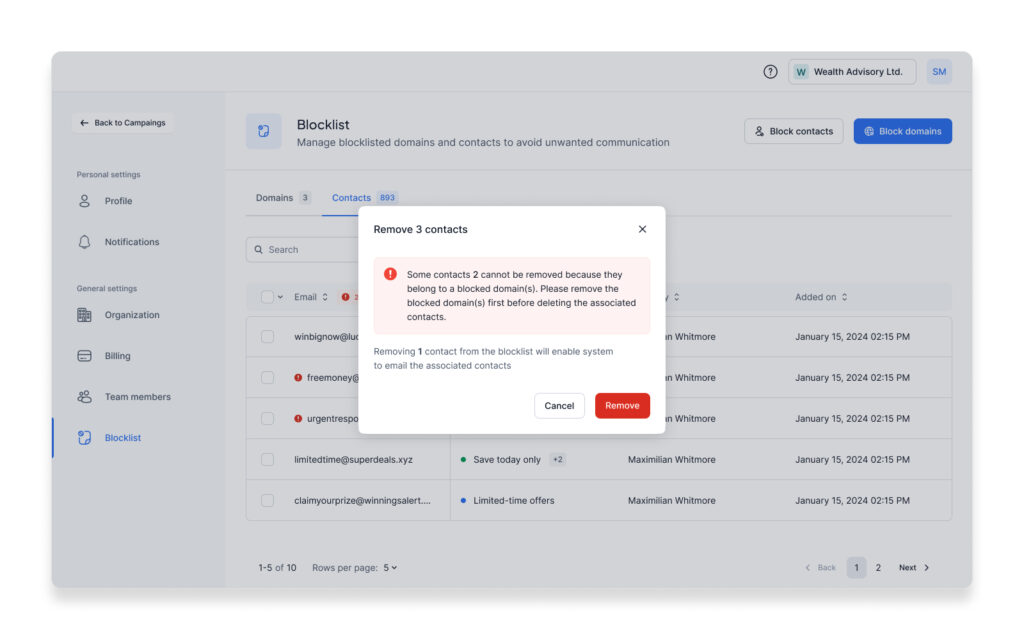
Team Management, Permission Rules, and Blocklist
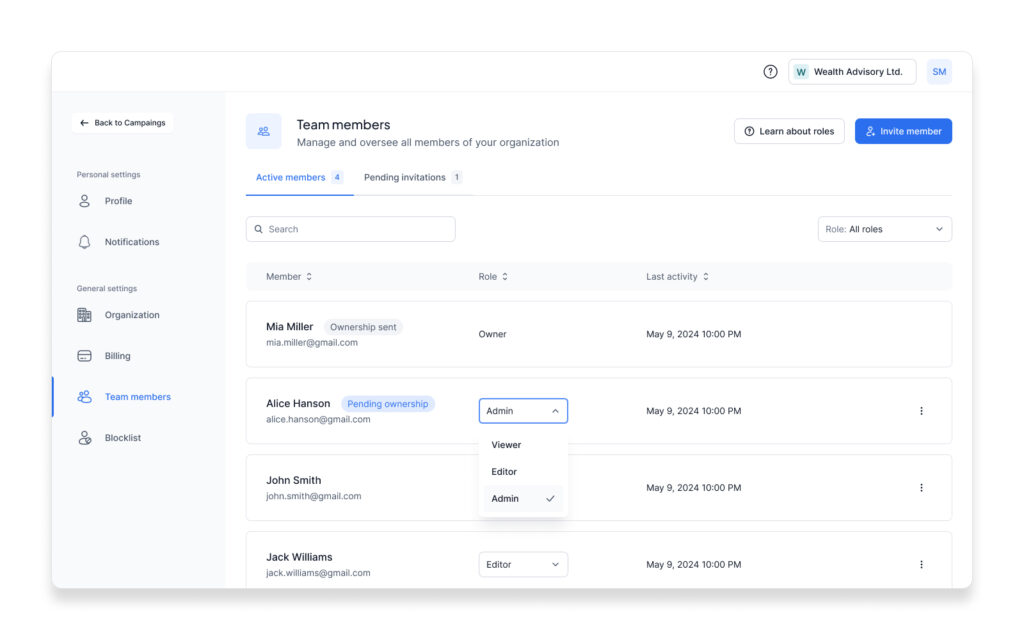
Efficient collaboration starts with well-structured team management and granular control over permissions. These screens illustrate how users can oversee team members, define roles, and assign privileges such as Admin, Editor, and Viewer. The dynamic role assignment ensures clarity in responsibilities while maintaining security. Additionally, the blocklist management tool allows users to prevent unwanted communication by blocking specific domains and contacts, with detailed prompts guiding them through the process. This feature ensures seamless organization while protecting outreach integrity and data quality.
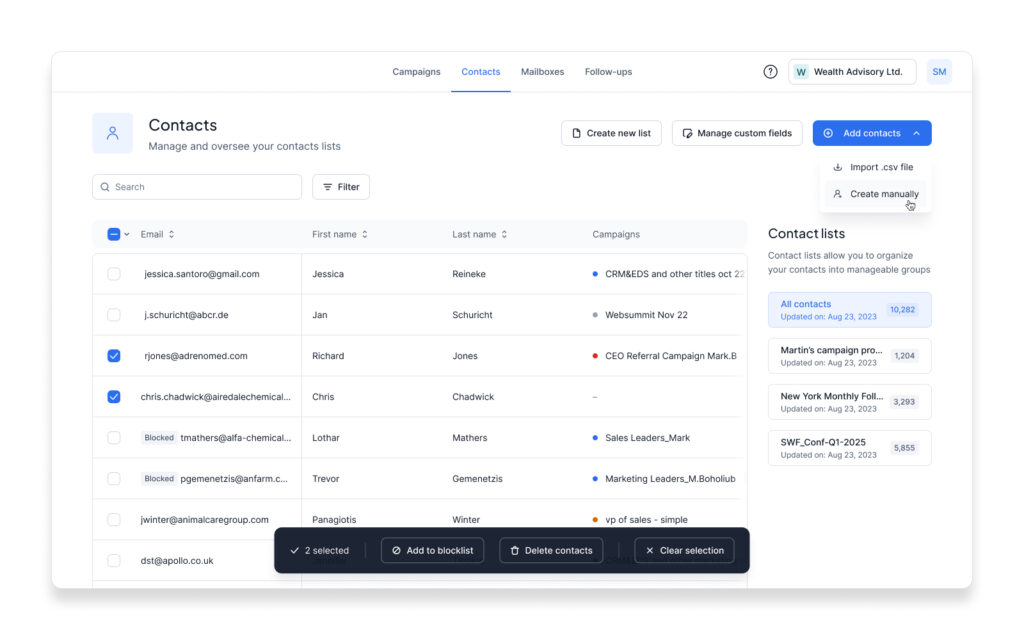
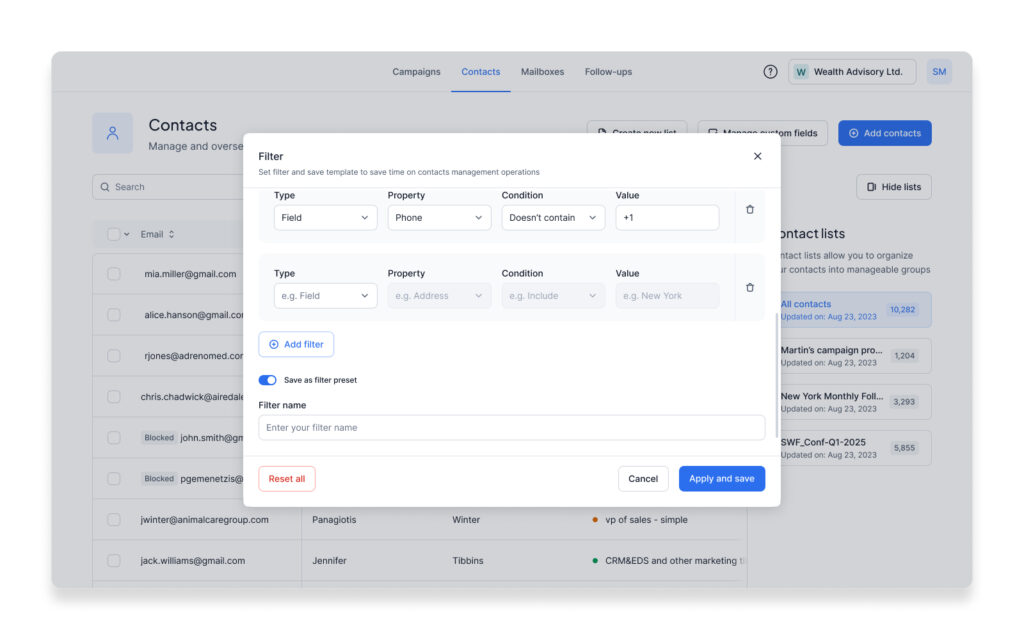
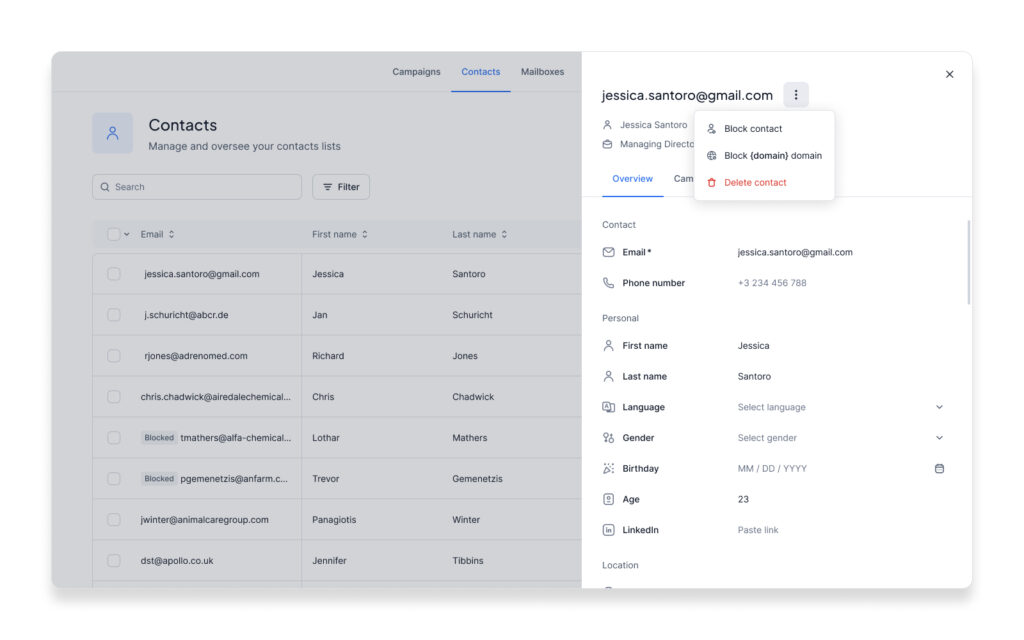
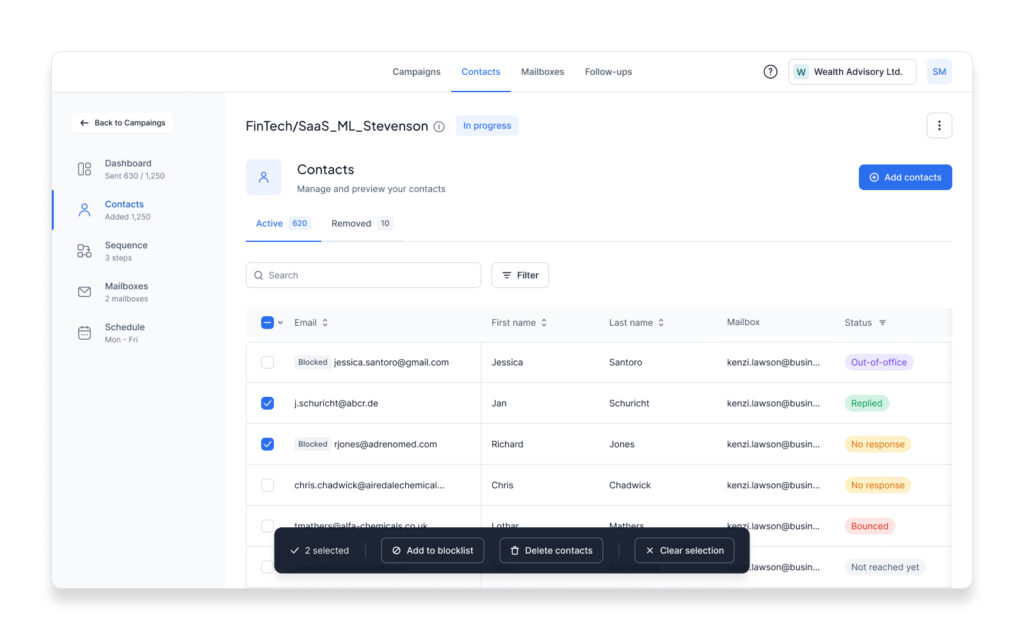
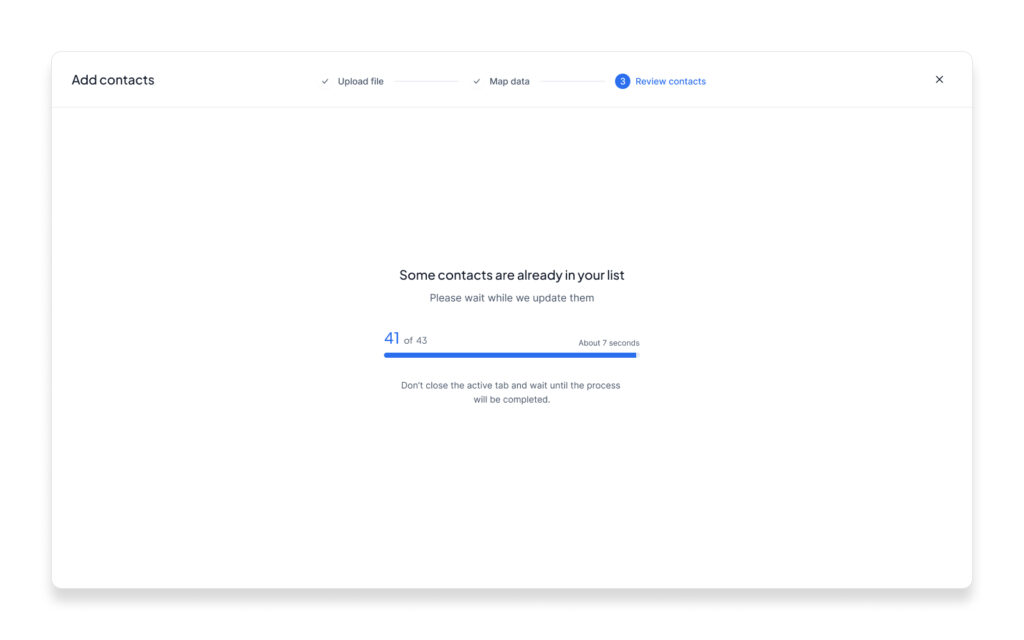
Contacts Management and Advanced Filtration Rules
Efficiently managing and filtering contacts is at the heart of any outreach platform. This feature set includes a streamlined interface for organizing contact lists, adding new entries manually or via file imports, and applying advanced filtering options. With precise rules for sorting and segmenting contacts, users can easily isolate relevant groups for targeted campaigns. The system also offers seamless blocking and deletion options, ensuring clean and accurate contact lists. These functionalities empower users to maintain optimal contact databases and maximize their outreach efficiency.
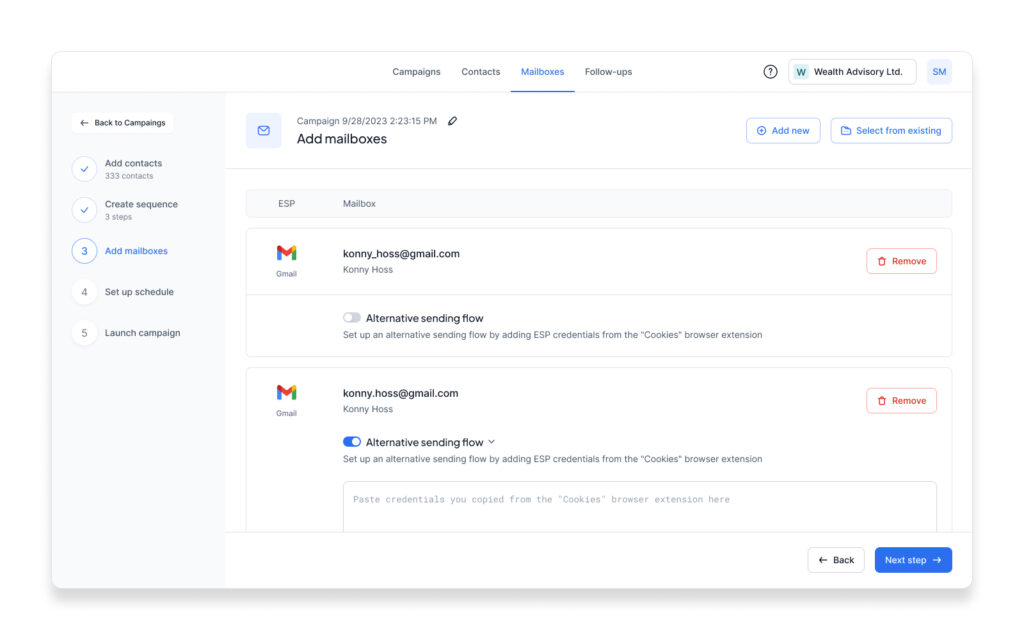
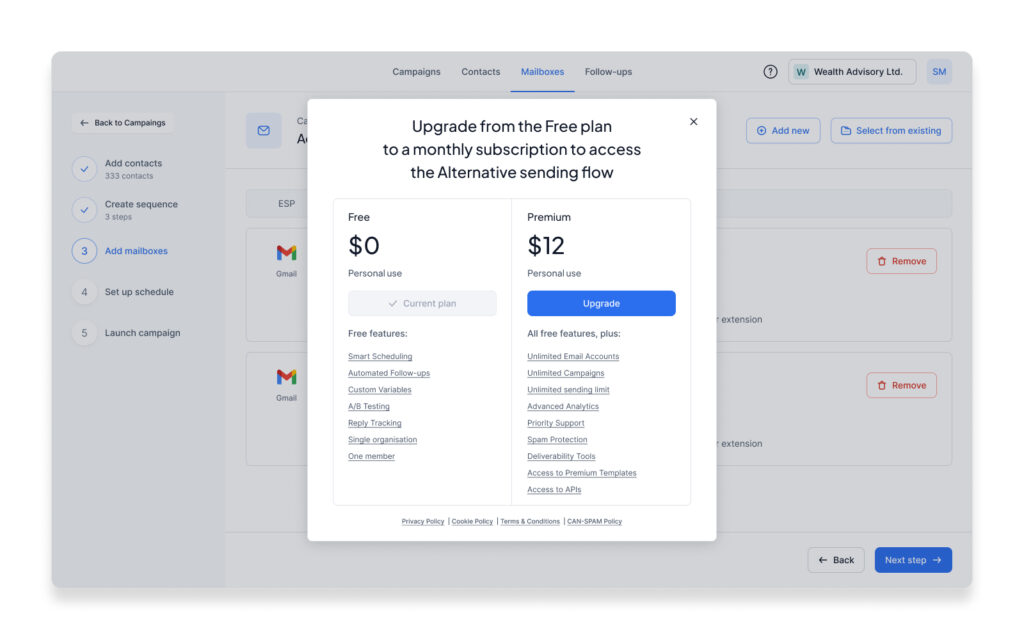
Mailbox Manager with Flexible Plans
The mailbox manager offers users an intuitive interface to add, manage, and customize their email sending configurations seamlessly. By allowing integration of multiple mailboxes with alternative sending flows, users can ensure optimal deliverability and streamlined operations. The subscription plans, users can choose between a free tier and premium upgrades, unlocking advanced features such as unlimited email accounts, campaigns, and detailed analytics. This system prioritizes user needs, balancing affordability with functionality, and encourages scalability for both individual and team operations.
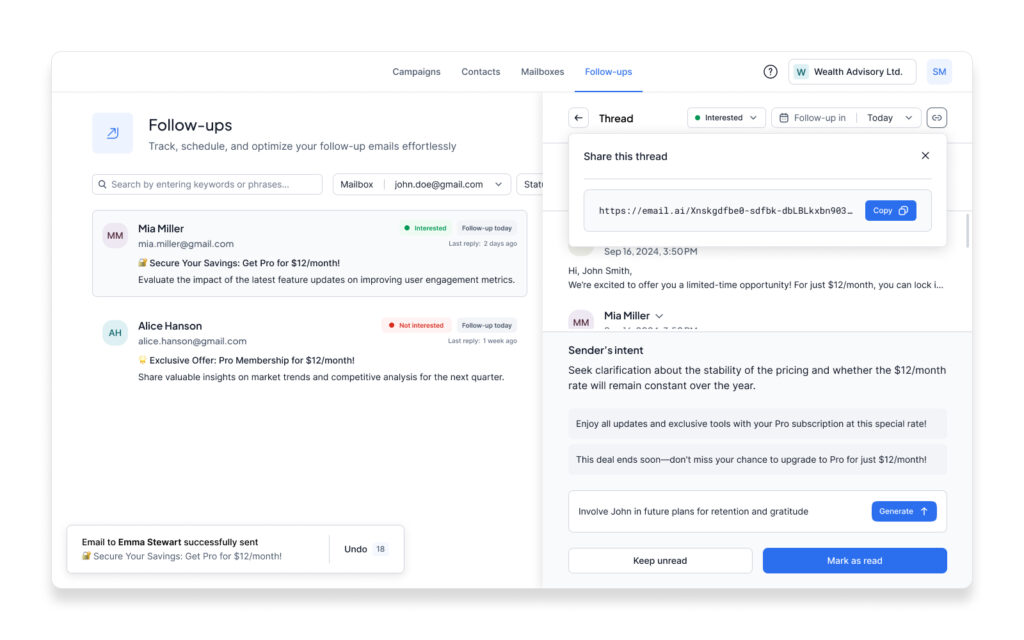
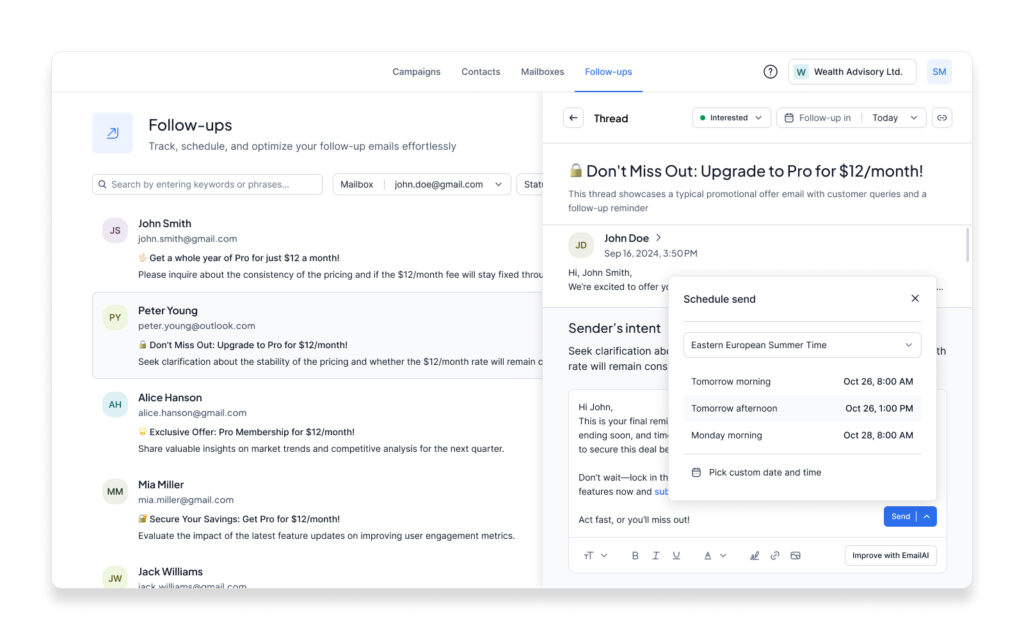
Engagement Continuity with Follow-Ups
The Follow-Ups module provides an intuitive interface to track, schedule, and manage ongoing communication with leads. It offers features like detailed thread views, sender’s intent analysis, and customizable follow-up scheduling for efficient outreach. With tools to identify engagement levels, such as “Interested” or “Not Interested,” and advanced AI-generated response suggestions, this section empowers users to maintain meaningful dialogue with minimal effort. Its clean design ensures quick navigation between threads, while the ability to generate personalized follow-ups enhances engagement success.
VI. Takeaways
Despite positive trends—growth in the user base, improved efficiency metrics, robust analytics, and favorable feedback from the community regarding usability and new features—these achievements did not significantly impact the product’s monetization process. The core issue was that decisions throughout the product lifecycle were not entirely product-driven but were heavily influenced by business-level directives tied to key development milestones.
The outcome of my work on this project remains ambiguous. While our team met all deadlines and delivered the agreed-upon scope, the project ultimately concluded with the team being disbanded due to budget exhaustion. This raises several critical questions:
-
Was the chosen strategy effective enough to prevent this outcome?
-
Should we, as a team, have been more proactive in challenging directives and advocating for alternative strategies, especially when potential crises were on the horizon?
-
Was there an adequate balance between short-term deliverables and long-term product goals?
-
Could stronger alignment between the product team and business stakeholders have mitigated the risk of budget exhaustion?
-
Did the team fully explore opportunities to pivot or adjust the monetization strategy in response to emerging challenges?
-
Were there missed opportunities to prioritize features that directly contributed to revenue generation?
-
How could greater transparency and collaboration between stakeholders have reshaped the project’s trajectory?
Answering these questions would require a thorough retrospective analysis. Yet, there are times when circumstances surpass our ability to influence them. One certainty remains: successful product development is fundamentally tied to generating revenue. A product that fails to achieve monetization cannot sustain itself. Consequently, any project that cannot ensure its financial viability cannot truly be considered successful.
Afterword
This case demonstrates that product design goes far beyond creating wireframes, developing design systems, and delivering specifications. It’s not just about conducting user research, analyzing trends in analytics, fostering cross-team collaboration, or deeply immersing oneself in the domain.
Product design also demands transparency in decision-making at the stakeholder level and alignment with a sound financial strategy. Even with strong metrics and visible achievements, a product can be shut down abruptly if its lifecycle pursues goals misaligned with the team’s vision for its development.